1700 81 6584 | www.digitallock.com.my
TRIDENT - SMART DIGITAL DOOR LOCK
3.4.User Management
3.4.1. Bluetooth management
Make sure there is no problem with Bluetooth communication. After connecting the
phone to the door lock as ab ove, Click " "to unlock.(the phone is within
5meters fr om the door lock)
3.4.2. Setting Passcode
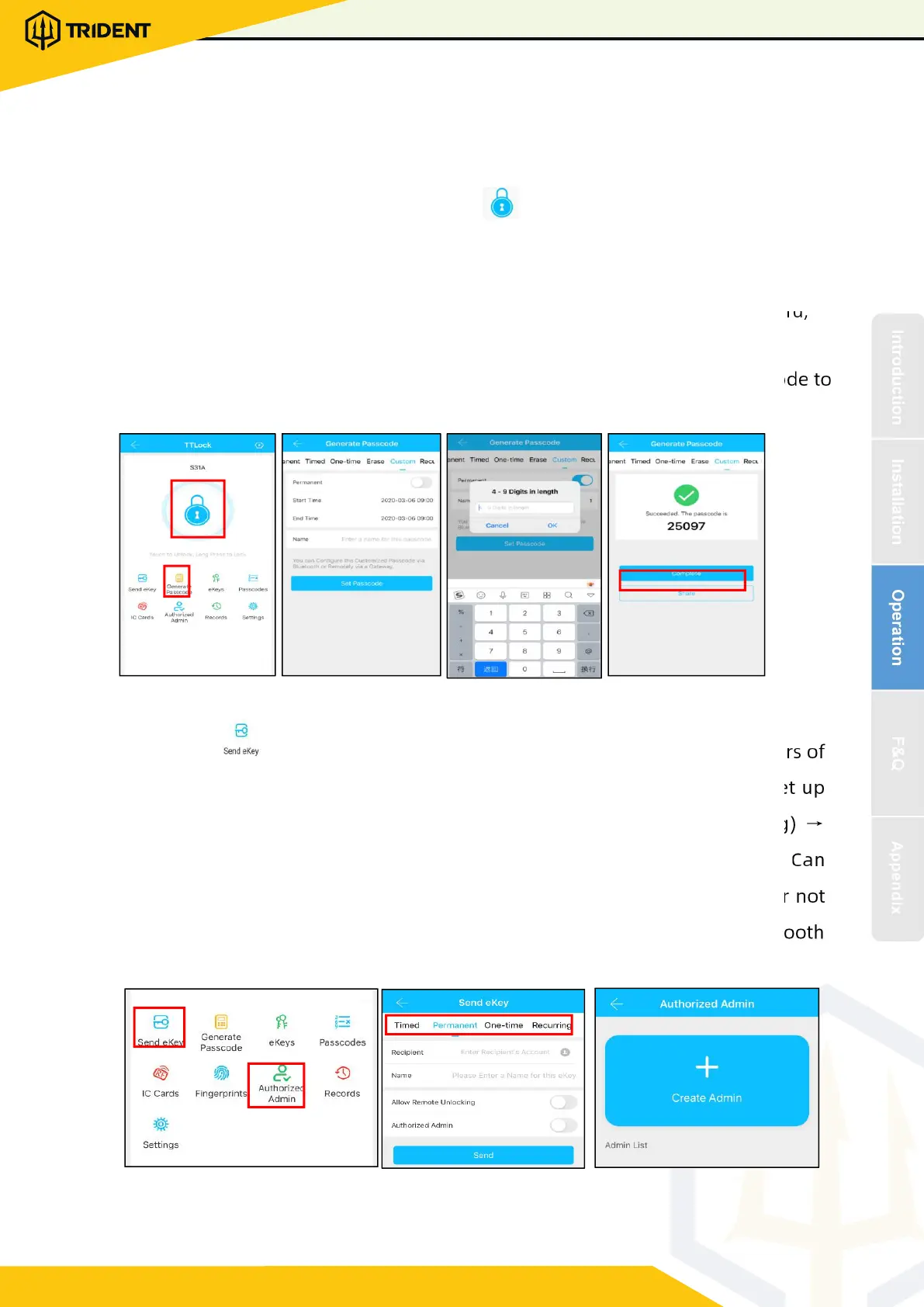
Passcodes are also a way to unlock. After entering the passcode on the locked keyboard,
press the unlock button in the lower right corner to unlock. Passcodes are divided into
permanent, time-limited, single, clear, cycle, and custom.(
You can s hare the Passcode to
other user via WeChat澝SMS澝Email澝Messenger澝WhatsApp)
3.4.3. Send e-Key
Click on the " " as shown i n figure, you can send the eKey to ot her users of
TTlock to authorize the unlock(the receiver must be do wnload the APP and set up
an account)ė Select e-key format (Timed, permanent, One-time, Recurring) ė
Enter recipient's account of TTlock,set the name and effective time of the eKey, Can
choose to allow remote unlocking or disallowing, authorized administrator or no t
authorized, as shown in figure
ė
Send
ė
The recipient's account has Bluetooth
unlock permission


 To Next Page