Need help?
Do you have a question about the Trident MANTA PRO and is the answer not in the manual?
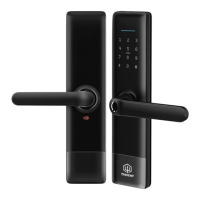
Details the physical components and dimensions of the smart lock.
Lists all items included in the smart lock packaging for verification.
Technical details including materials, voltage, and operating environment.
Instructions for adjusting the door handle's orientation for installation.
Visual step-by-step guide for installing the smart lock model 3585.
Guide on downloading the TTLock app and creating a user account.
Steps to pair the smart lock with your smartphone via the TTLock app.
Process for adding the smart lock device to the TTLock application.
Managing Bluetooth connection for unlocking the door lock with a smartphone.
Generating and managing various types of passcodes for door access.
Sharing digital keys (e-keys) with other users for temporary or permanent access.
Process for adding IC cards to the smart lock for entry.
Process for adding fingerprints to the smart lock for biometric access.
Managing existing e-keys and passcodes, including modifications.
Querying and viewing the history of door unlocks and access events.
Steps to pair the gateway with the TTLock app for extended connectivity.
Understanding gateway functionality and managing locks through it.
Instructions on how to view unlock and access history.
Troubleshooting why unlocking fails after enabling passage mode.
Explanation of the auto-lock feature and its timing.
Troubleshooting steps for a non-responsive touchscreen or keyboard.
Solutions for problems encountered during fingerprint registration.
Reasons and solutions for the smart lock consuming battery power quickly.
Diagnosing issues with handle response or motor operation.
Information on how many wrong password attempts lead to lockout.
 General
| Brand | Trident |
|---|---|
| Model | MANTA PRO |
| Category | Door locks |
| Language | English |

 To Next Page