ModCom One™ Quick Start Guide
Trident Communication Technology™ Company Confidential 3
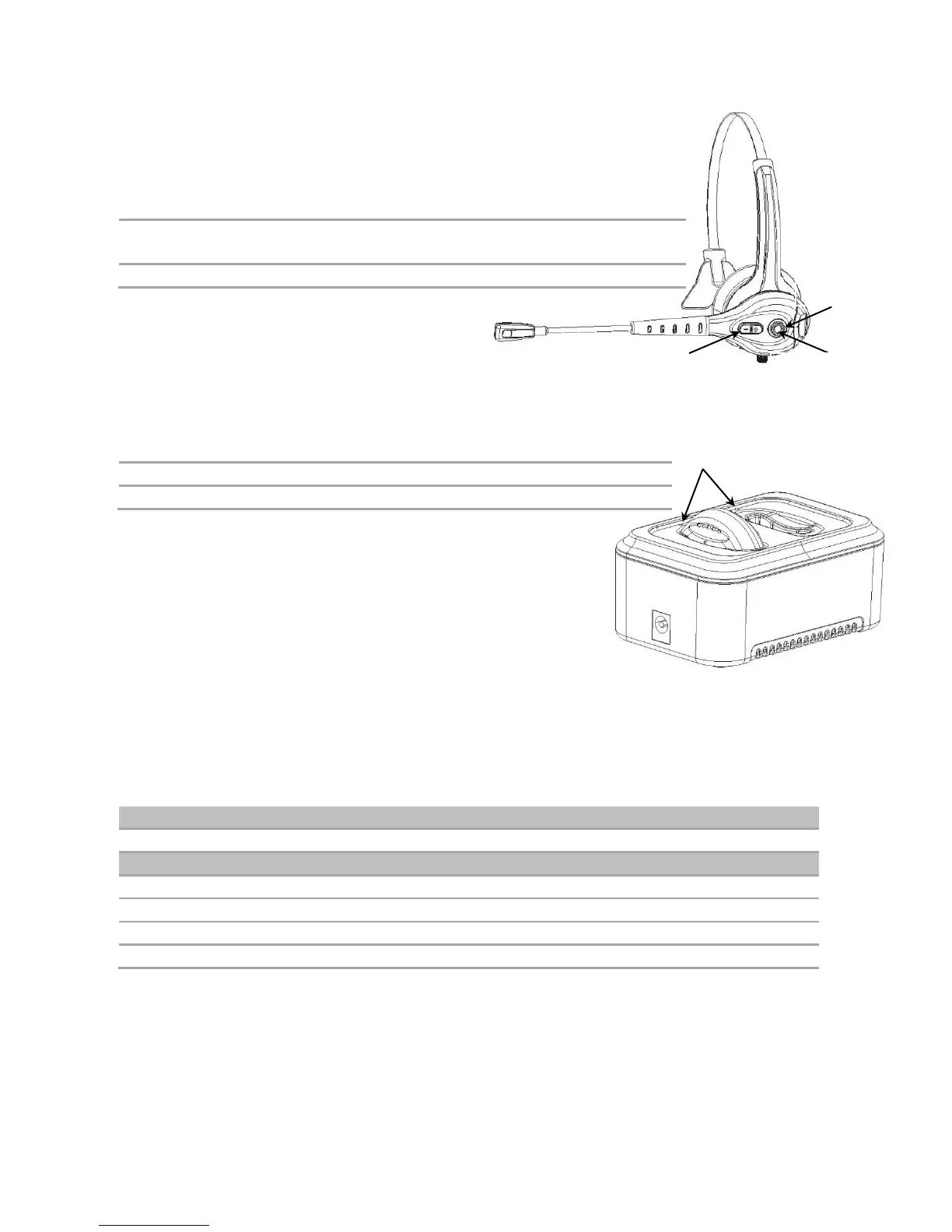
Headset Overview
Power On/Off, Pairing, Answer, Reject, End Call,
Voice Dial, Play and Pause
Volume Increase and Decrease, Last Number Redial
Track Forward and Back
Multi-Color, Solid and Flashing LED Status Indicator
Battery Charger Overview
*2-Bay and 10-Bay Chargers are sold separately.
Battery Charging
Although the Batteries are partially charged at the factory, we recommend you fully charge them before
first use. Please allow up to 3 hours for a full charge.
1. Plug the small end of the Power Adapter Cable into the Charging Station’s Power Jack
2. Plug the Power Adapter into a 100-240V 50/60Hz AC Power Receptacle
3. Insert Batteries into the Charging Slots**
Approximately 1.5 Hours - Max Time: 3 Hours ± 30 Minutes
Multi-Color, Solid and Flashing LED Status Indicator Status
During power up, indicates charger is operational
No battery in charging slot
**Ensure that you follow the guidelines for Battery Safety described in Battery Safety Guidelines
on page 8.
2 or 10 Battery Charging Slots*
Multi-Color, Solid and Flashing LED Status Indicator
2-Bay Charging Station Power Adapter


 To Next Page