EasyManua.ls Logo

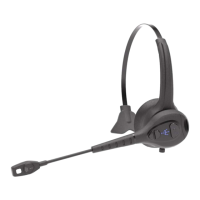
Trident ModCom One - Position the Boom; Adjust Headband

Trident ModCom One
12 pages
Print Icon
To Next Page IconTo Next Page
To Previous Page IconTo Previous Page
Loading...
ModCom One™ Quick Start Guide
Trident Communication Technology™ Company Confidential 5
Understanding LED Lights and Tones
Primary Features
Headset Control
LED Light
Tones
Pairing
With Power Off, Press Multi-
Function Button for 4 Seconds
Blue and Red
Alternate Flash
“Pairing”
Pairing Complete
Automatic
No LED Output
“Pairing Successful
Power On
Press Multi-Function Button for 2
Seconds
Blue Flash 3 Times
“Power On”
Power Off
Press Multi-Function Button for 2
Seconds
Red Flash 3 Times
“Power Off” or
4 Note Falling Scale
Volume
Press Volume + or Volume - to
Increase or Decrease Volume
No LED Output
< Increase Volume
>Decrease Volume
Connected
Automatic
No LED Output
Double Short
Not Connected
Automatic
Blue Solid
“Lost Connection”
Clear Paired Device List
Press Multi-Function and
Volume for 7 Seconds
Red Alternate Flash
5 Times
Double Low
Link Lost
Automatic
No LED output
“Lost Connection”
Low Battery Warning
Automatic
Red Flash Twice
Every 2 Seconds
“Low Battery”
Low Battery Shutdown
Automatic
Red Flash 3 Times
4 Descending
Auto Shutdown
Automatic
Red Flash 3 Times
then Power Off
4 Descending
Audio/Video Playback
Features
Headset Control
LED Light
Tones
Play or Pause
Press Multi-Function Button for
0.5 Seconds
No LED Output
Short High
Track Forward
Press Volume Up for 1 Second
No LED Output
Short High
Track Backward
Press Volume Down for 1 Second
No LED Output
Short High
Phone Call Features
Headset Control
LED Light
Tones
Answer/End Call
Press Multi-Function Button for
0.5 Seconds
No LED Output
One Short
Ignore a Call
Press Multi-Function Button for 1
Second
No LED Output
Long Low
Answer Second Call
Press Multi-Function Button for
0.5 Seconds
No LED Output
One Short
Ignore Second Call
Press Multi-Function Button for 1
Second
No LED Output
Long Low
Last Number Redial
Press Volume + and Volume for
0.5 Seconds
No LED Output
Long Low
Voice Activation
Double Click Multi-Function
Button
No LED Output
One Short

Other manuals for Trident ModCom One