PartNo:MC1ReferenceGuidev2.0 4
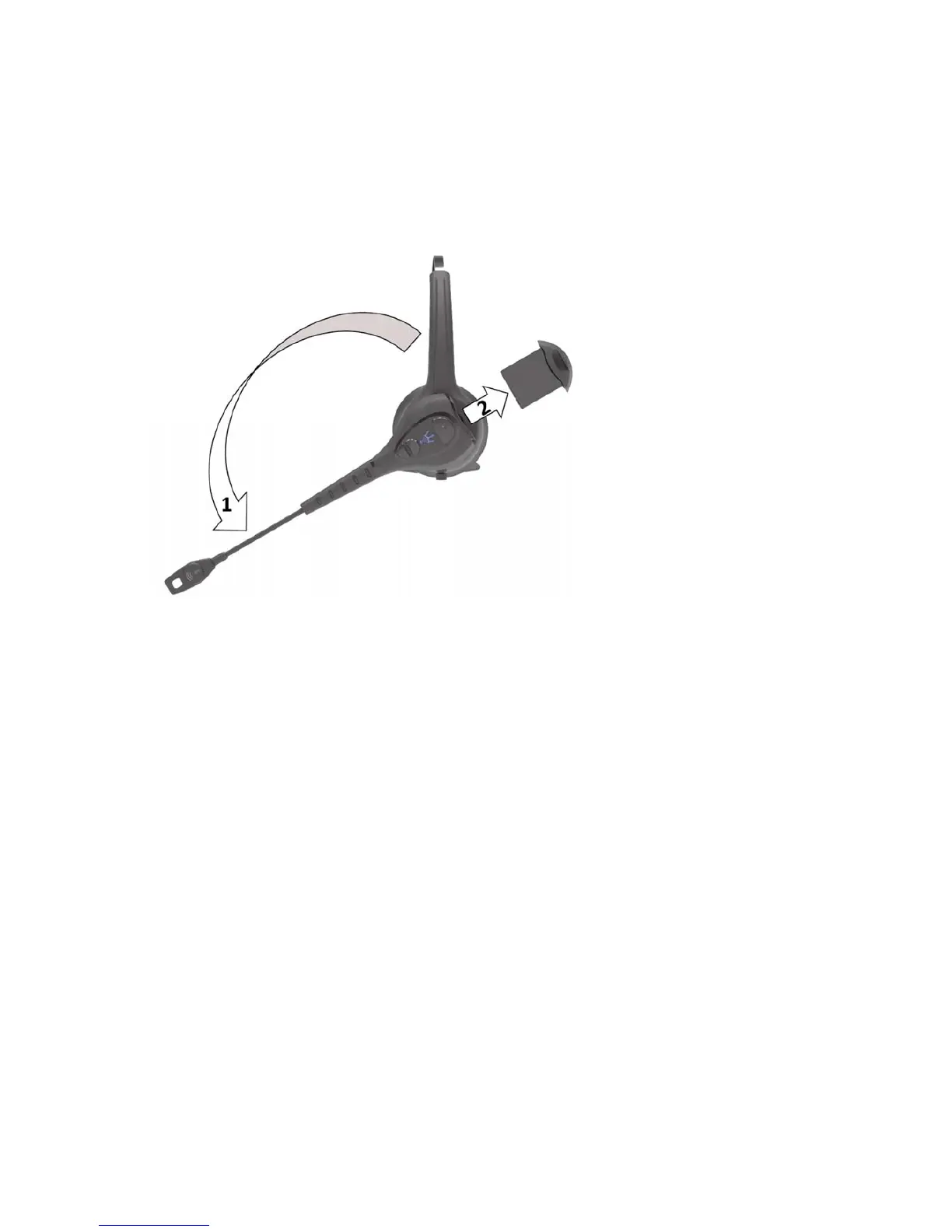
BatteryExtraction
1. PivotHeadsetModule45degreesdownwarduntilitstops.
2. RemoveBatteryfromBluetoothHeadsetModule.
ConnectingHeadsettoDevice
TousetheModComOneHeadsetwithaBluetoothDevice(or“Host”),suchasamobilecomputeror
industrialtablet,youmustfirstestablishawirelessconnectionbetweentheHeadsetandtheintended
Device.Thisprocessiscalled“Pairing”.
Pairing
TheHeadsetmaybepairedwithBluetoothdevicesinthefollowingthreeways:
1. Touch‐to‐PairwithdevicessupportinganNFCConnection.
2. Scan‐to‐PairwithdevicessupportingBluetoothMacAddressScanning.
3. StandardBluetoothpairingwheretheheadsetisdiscoveredbytheHost.
Headsetmustbewithinclose
proximityofthehosttocompletepairing.Toinitiatepairing,Headset
mustbepoweredoff.Iftheheadsetison,turnoffbypressingtheMulti‐FunctionButton(MFB)for2
seconds.InitiateheadsetpairingbypressingtheMulti‐FunctionButtonfor7secondsuntilyouhear
“Pairing”andthe
LEDalternatelyflashesredandblue.
1. ForTouch‐to‐Pair,touchHeadsetNFCtag,locatedinthemicrophoneassembly,toNFCtagofHost.
2. ForScan‐to‐Pair,activateHostscanningfunctionandscanHeadsetBluetoothMacAddressBarcode
Label.


 To Next Page