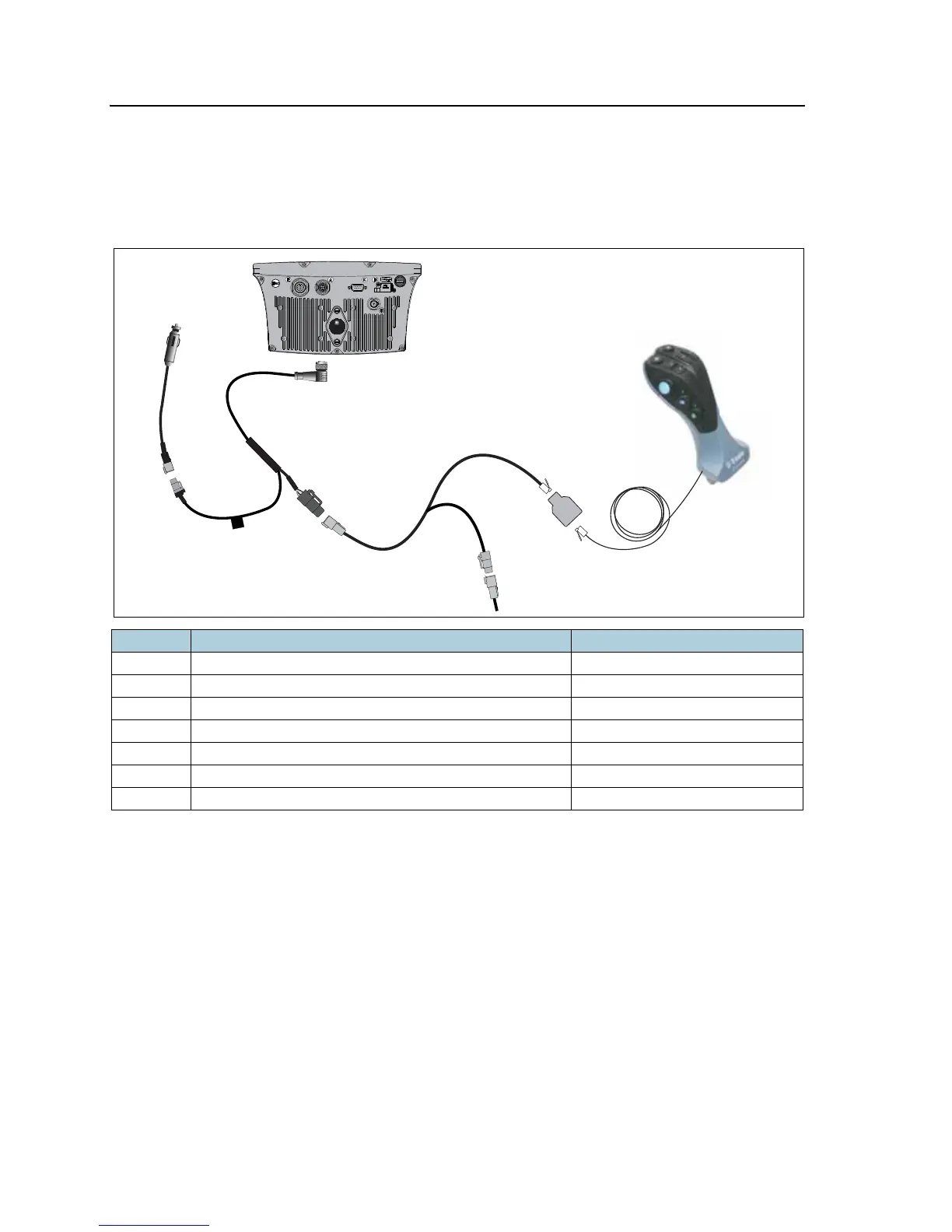
9 Connecting an EZ-Remote Joystick
78 EZ-Guide 250 System Cabling Guide
Connecting an EZ-Remote joystick to the EZ-Guide 500 lightbar
This figure shows how to connect the EZ-Remote joystick to the EZ-Guide 500
lightbar—connect the EZ-Remote cable (P/N 67094) (4) to the 4-pin Deutsch
connector on cable P/N 62817 (2):
Notes:
• For a standalone system, connect the CAN terminator (P/N 59783) (5) to the 4-pin
Deutsch plug on the EZ-Remote cable (4).
• If you are using an EZ-Steer system, connect the appropriate cable to the 4-pin
Deutsch plug on the EZ-Remote cable (4).
• For details on how to connect the remaining parts of those systems, refer to your
display documentation.
Item Description Part number
1 EZ-Guide 500 lightbar 66100-xx
2 Power cable 62817
3 Power connector cable 62818
4 EZ-Guide 500 to LB25 remote lightbar cable 67094
5 CAN terminator 59783
6 Splitter cable, RJII F to 2x RJII F 72422
7 EZ-Remote joystick 83200-00



 To Next Page