6
Create a Curved Line
Use the Curve pattern when you want to work the eld with gentle
curves.
1. Tap .
2. When you are ready to begin recording the line, tap
3. When you are at the end of the line, tap to stop recording.
Create a Landmark Line
Use this line to identify continuous elements of your eld to be
avoided, such as a fence, ditch, access road, etc.
1. Tap .
2. When you are ready to begin recording the line, tap .
3. When you are at the end of the line, tap to stop recording.
Create a Landmark Point
A Landmark Point identies singular elements of your eld to be
avoided, such a tree, rock, etc.
When you are driving and want to create a landmark point, tap
.
Create a Landmark Area
(productive or non-productive)
The Landmark Area allows you to identify an entire region to be
avoided, such as a pond, marsh, or area that does not need to be
worked again.
1. For a productive area, tap ;
for a non-productive area, tap
2. Tap to begin recording the area.
3. Drive to the ending boundary of the area and then tap .
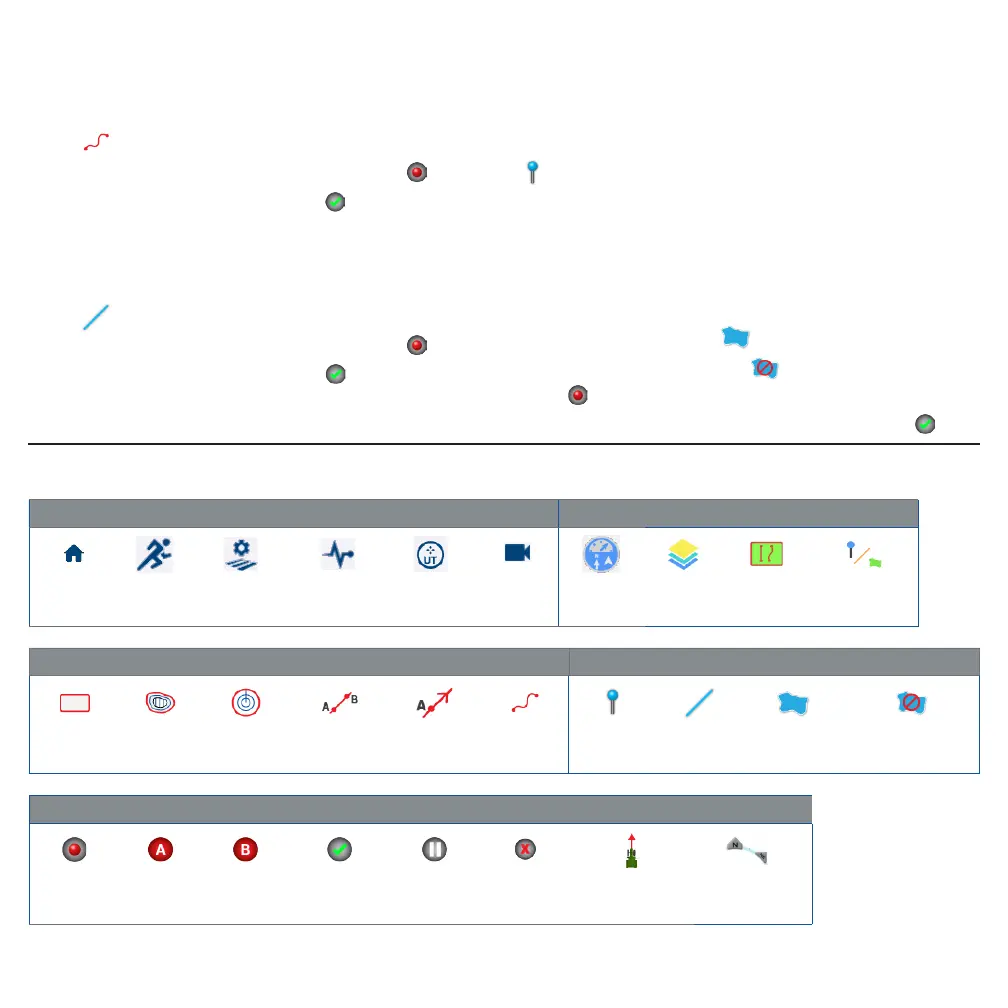
COMMON PRECISION-IQ ICONS
Activity Bar Icons Run Screen Icons
Home Run
Field
Manager
Diagnostics
Universal
Terminal
Camera
Widgets
Menu
Layers Boundaries Landmarks
Guidance Pattern Boundaries, Patterns, and Lines Icons Landmark Icons
Boundary Headland Pivot AB Line A+ Line Curve Point Line Area
Non-productive
area
Recording Buttons
Record Set A Set B Complete Pause Cancel
Use current
heading
Compass
controls



 To Next Page