A
B
C
B
E
D
G
F
1
2
3
4
4
Installation
Rack Mounting
Mount your equipment in either a 4-post or 2-post rack or rack enclosure (see next page for
2-post mounting). The user must determine the fitness of hardware and procedures before
mounting. If hardware and procedures are not suitable for your application, contact the
manufacturer of your rack or rack enclosure. The procedures described in this manual are for
common rack and rack enclosure types and may not be appropriate for all applications.
4-Post Mounting
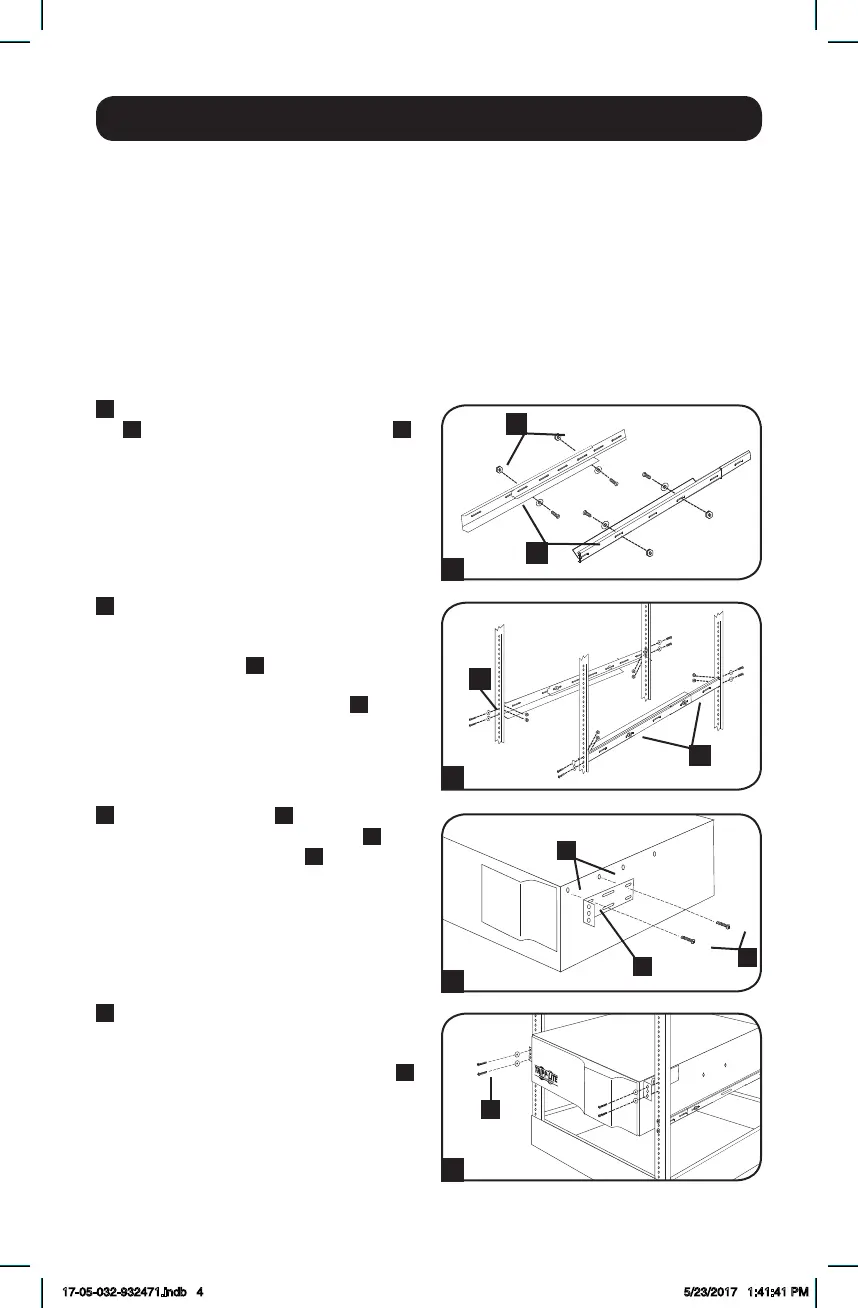
All UPS models include hardware required to mount in a 4-post rack. Select models include an
adjustable rackmount shelf kit to provide additional support. If your UPS model does not
include an adjustable rackmount shelf kit, skip steps 1 and 2.
1
Connect the two segments of each shelf
A
using the included screws and nuts
B
.
Leave the screws slightly loose so that the
shelves can be adjusted in the next step.
2
Adjust each shelf to fit your rack, then
mount them in the lowest available space
of your rack with the screws, nuts and
washers provided
C
. The support ledges
should face inward. Tighten the screws
that connect the shelf segments
B
.
3
Attach mounting ears
D
to the front
mounting holes of your equipment
E
using the provided screws
F
. The ears
should face forward.
4
Using an assistant (if necessary), lift your
equipment and slide it onto the mounting
shelves. Attach your equipment to the
rack by using the appropriate hardware
G
through its mounting ears and into the
rack rails.
17-05-032-932471.indb 4 5/23/2017 1:41:41 PM




 To Next Page