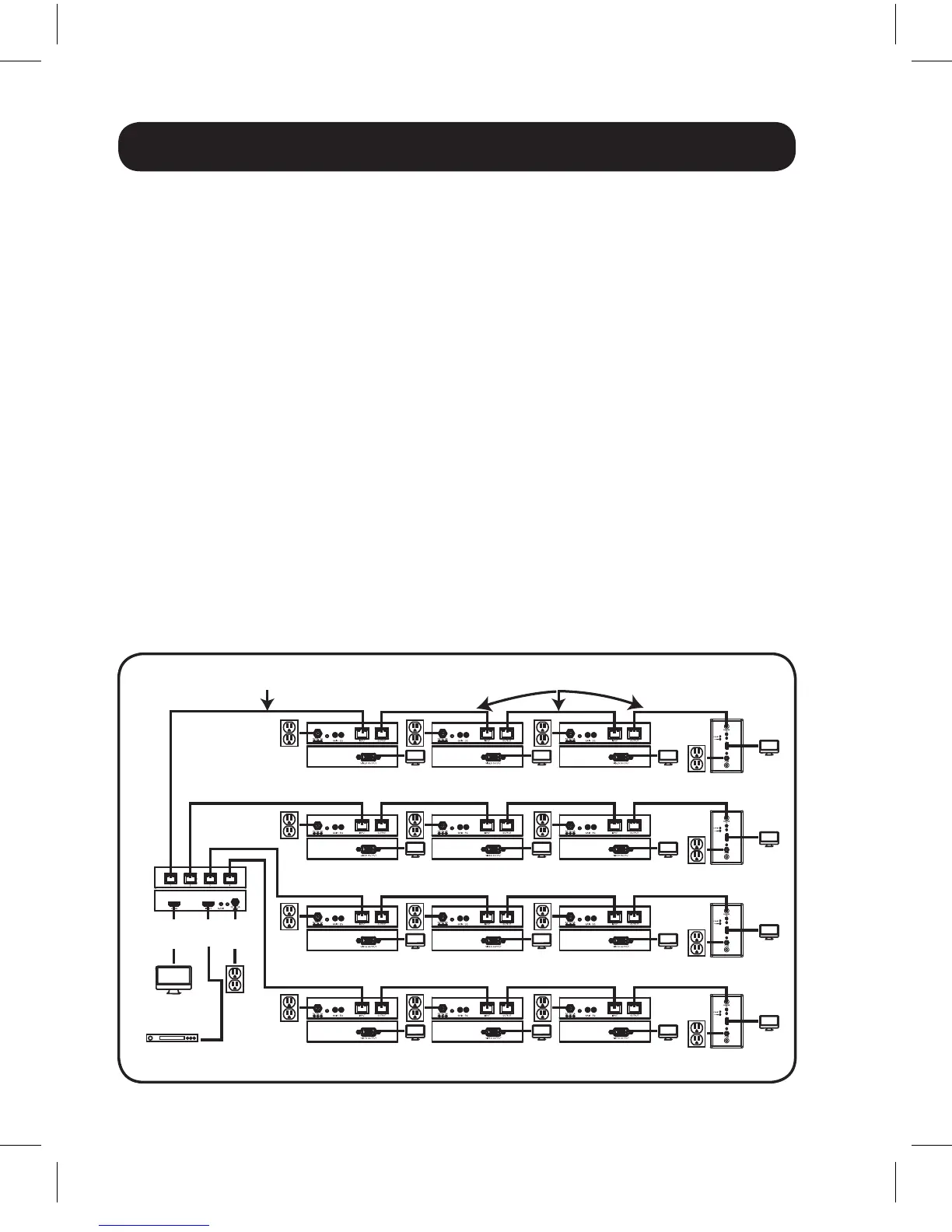
OPTIONAL LOCAL
MONITOR
B126-004 LOCAL
TRANSMITTER
B126-110 REMOTE/
REPEATER
B126-110 REMOTE/
REPEATER
B126-110 REMOTE/
REPEATER
Up to 175 ft. at 1080i (60Hz)
Up to 125 ft. at 1080p (60Hz)
Up to 175 ft. at 1080i (60Hz)
Up to 125 ft. at 1080p (60Hz)
BLU-RAY
B126-110 REMOTE/
REPEATER
B126-110 REMOTE/
REPEATER
B126-110 REMOTE/
REPEATER
B126-110 REMOTE/
REPEATER
B126-110 REMOTE/
REPEATER
B126-110 REMOTE/
REPEATER
B126-1A0-WP-1
REMOTE RECEIVER
B126-1A0-WP-1
REMOTE RECEIVER
B126-1A0-WP-1
REMOTE RECEIVER
B126-1A0-WP-1
REMOTE RECEIVER
B126-110 REMOTE/
REPEATER
B126-110 REMOTE/
REPEATER
B126-110 REMOTE/
REPEATER
16
Extender/Splitter with Remote/Repeater Installation
Notes:
1) Test to make sure the entire installation works properly before pulling
cables through ceilings/walls.
2) To achieve maximum distance and performance, use 24 AWG solid
wire Cat5e/6 cable. Using stranded wire Cat5e/6 cable, or cable
with a gauge (AWG) size higher than 24 AWG, will result in shorter
extension distance. Higher gauge cabling, such as 26 AWG, has a
more limited transmission capability than lower gauge cabling. All
Tripp Lite N202-Series Cat6 cables are made with 24 AWG solid wire
cabling.
3) The B126-002 and B126-004 are set to transmit a stereo audio
signal by default. Press the Audio button on the local unit to switch to
7.1-channel surround-sound audio.
4) The installation diagram shows the B126-004. The B126-002
installation will be the same, except there are only 2 remote ports
and there is no local monitor port.
201109206-93-3023-EN.indd 16 10/24/2011 10:01:23 AM



 To Next Page
 Loading...