A
B
7
Installation
Network Connection
5-1
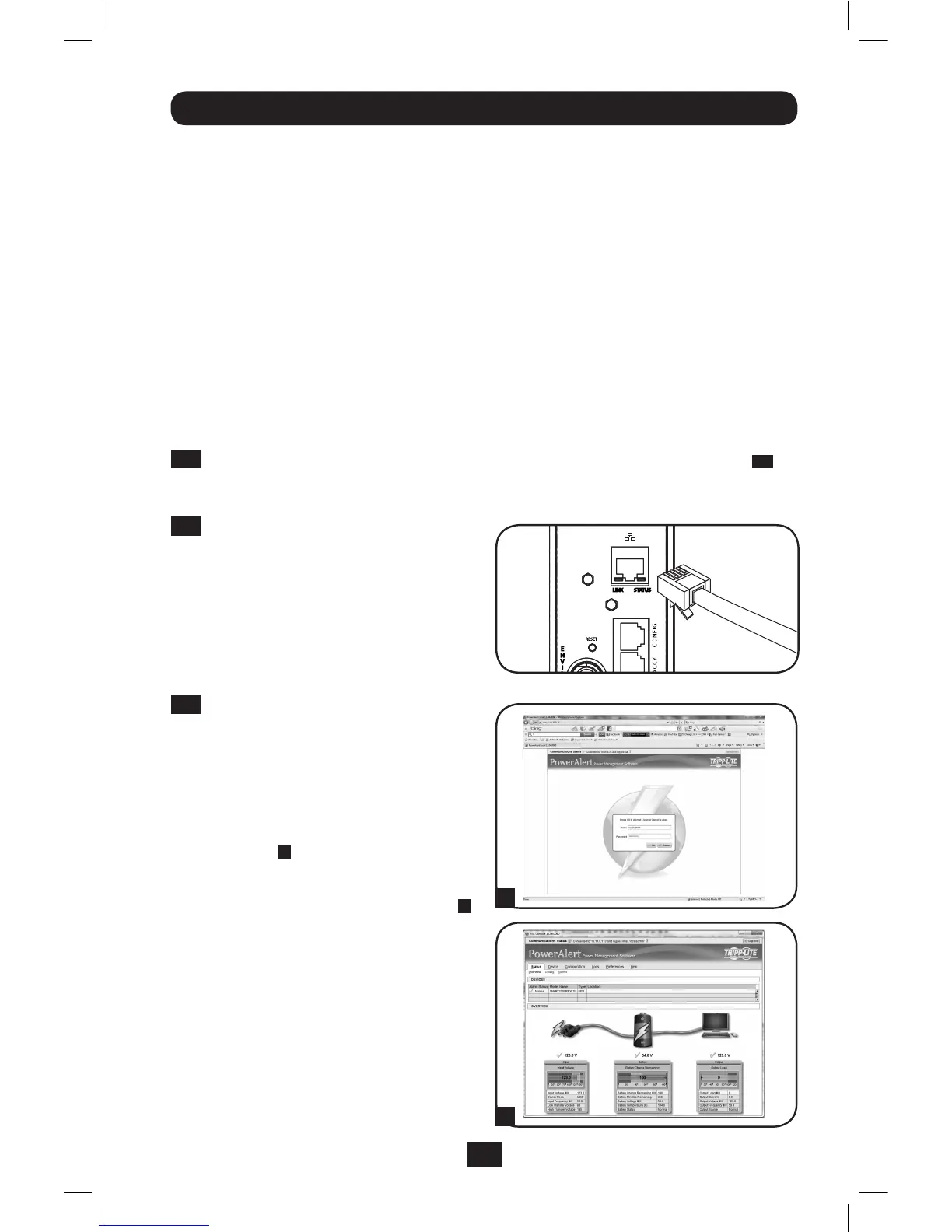
Connect PDU to Network: While the
PDUispowered,connectastandard
EthernetpatchcabletotheRJ-45
EthernetportonthePDU.
Note: This port is not compatible with PoE
(Power over Ethernet) applications.
5-2
Access PDU with Web Browser: After
anIPaddresshasbeenassignedtothe
PDU,attempttoaccessitwithaWeb
browserthatsupportsframes,forms
andJava™.OpenaWebbrowserona
computerconnectedtotheLANand
entertheIPaddressassignedtothe
PDU.Youshouldbepromptedfora
password
A
. The user name is admin
and the default password is admin.
After you enter the user name and
password,thePowerAlertstatuspage
B
willappearinthebrowserwindow.For
moreinformationaboutconguration
andoperationofthePDUviathe
PowerAlertinterface,refertothe
SNMPWEBCARDUser’sGuide,included
ontheCD-ROMbundledwiththePDU.
Note for Network Management System
Users Only: Two MIB files - Tripplite.mib
and RFC1628.mib - must be loaded on
each Network Management Station that
will monitor the PDU via SNMP. The files are
provided on the CD-ROM included in the
product package.
Enable SNTP? [Y]
Enable FTP? [Y]
Port number? [21]
Enable HTTP? [Y]
Port number? [80]
Enable HTTPS? [Y]
Port number? [443]
Enable Telnet Menu? [Y]
Port number? [23]
Enable Telnet Programs? [Y]
Port number? [5214]
Enable SSH Menu? [Y]
Port number? [22]
Enable SSH Programs? [Y]
Port number? [2112]
Enable SNMP? [Y]
Port number? [161]
Enable SNMPv1? [Y]
Enable SNMPv2c? [Y]
Enable SNMPv3? [Y]
Youcanalsochangetherootpassword,real-timeclockandothersettings.(TrippLite
recommends against changing the default settings unless you are an advanced user with a
specicpurpose.)Afteryouhavenishedenteringsettings,thePDUwillsavechangestomemory
andreboot(thismaytakeseveralminutes).AfterthePDUreboots,theinitializationpageshould
displaythenewstaticIPsettings.
4-6
Remove Serial Cable:RemovetheserialcablefromthePDUandproceedtoStep
5-1
.
Network Service Configuration
ThefollowingpromptsconguretheconnectionmethodsthattheSNMPWEBCARDwillaccept.
201207109-93-3161.indb 7 8/14/2012 2:03:48 PM




 To Next Page