
EasyManua.ls Logo

Tripp Lite SRCOOL18K - User Manual

Tripp Lite SRCOOL18K
40 pages
Print Icon
To Next Page IconTo Next Page
Loading...
PROTECT YOUR INVESTMENT!
Register your product for quicker service and ultimate peace of mind.
You could also win an ISOBAR6ULTRA surge protector—a $50 value!
www.tripplite.com/warranty
1
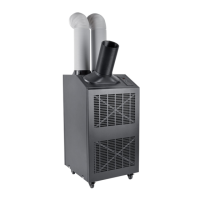
Portable Air Conditioning Unit
SRCOOL18K, SRCOOL24K
(208/240V, 60 Hz)
Owner’s Manual
Introduction 2
Important Safety Instructions 2
Unpacking 3
Features 4
Installation 5
Operation 10
Maintenance 11
Troubleshooting 11
Storage and Service 13
Warranty and Product Registration 13
Español 14
Français 27
1111 W. 35th Street, Chicago, IL 60609 USA • www.tripplite.com/support
Copyright © 2015 Tripp Lite. All rights reserved.

Questions and Answers

  • C
    Christopher CoxAug 5, 2025
    Why is my Tripp Lite Portable air conditioner not cooling properly?
    • J
      Jason RussellAug 5, 2025
      If your Tripp Lite Portable air conditioner's cooling performance is unsatisfactory, first, ensure that all air exhausts and intakes are free from any obstructions. Then, adjust the temperature setting to a lower level and increase the fan speed. Also, clean or replace the air filters. If the room is too large or the ambient temperature is too high for the unit's cooling capacity, consider installing additional units or contact Tripp Lite for alternative cooling solutions.
  • T
    Todd KellerAug 14, 2025
    What to do if my Tripp Lite SRCOOL18K Portable air conditioner doesn't function?
    • T
      Terri DavisAug 14, 2025
      If your Tripp Lite Portable air conditioner is not working, make sure it is turned on. If it's already on, check that the unit is properly plugged into a working outlet and that the main power supply (fuses or circuit breaker) is active.
  • D
    David LinAug 25, 2025
    How to fix ice buildup in Tripp Lite SRCOOL18K?
    • D
      Devin BowenAug 26, 2025
      If your Tripp Lite Portable air conditioner has ice or frost buildup, it might be operating in an environment with excess humidity. You can either turn off the unit and let it defrost, then ensure it operates with the fan speed set to HIGH. Alternatively, turn off the unit to defrost it, and then operate it in DEHUMIDIFY MODE, or increase the desired temperature setpoint.

Summary

Introduction

Important Safety Instructions

Unpacking

Features

Installation

Unit Placement

Guides on positioning the unit for optimal ventilation and access.

Cooling Duct Connection

Instructions for connecting the flexible duct for focused cooling.

Exhaust Duct Connection

Steps for connecting the warm air exhaust ducts.

Drop Ceiling Exhaust Connection

Procedures for venting exhaust through a drop ceiling.

Window Exhaust Connection

Methods for venting exhaust through a window opening.

Drainage Plug Insertion

Explains drain plug use for condensation management and modes.

Low Temperature Operation

Guidance on using Dehumidify Mode for cold environments to prevent icing.

Operation

Power

How to turn the unit on/off and its three-minute compressor delay.

Automatic Restart Feature

Explains how the unit resumes operation after a power outage.

Cool Mode

Details on selecting Cool Mode, setting temperature, and fan speeds.

Dehumidify Mode

Instructions for using Dehumidify Mode and its settings.

Timer

How to schedule the unit to turn on or off automatically.

Quiet Control Mode

Guides on activating Quiet Mode for reduced noise levels.

Changing Degree Units

Steps to switch temperature display between Celsius and Fahrenheit.

Maintenance

Replacing the Air Filters

Procedure for cleaning or replacing condenser and evaporator air filters.

Cleaning the Cabinet

Instructions for safely cleaning the unit's exterior casing.

Troubleshooting

Additional Display Codes

Explains error codes (E0-E4) and the 'dF' code for unit issues.

Storage and Service

Storage

Recommendations for properly storing the unit when not in use.

Service

Steps for obtaining technical support and returning the product for repair.

Warranty and Product Registration

Warranty

Details of the 1-year limited warranty and its terms.

Product Registration

Instructions on how to register the product for benefits and drawings.

Regulatory Compliance Identification Numbers

Information on product series numbers for compliance certifications.

WEEE Compliance Information

Guidelines for European Union customers regarding WEEE directive.

Tripp Lite SRCOOL18K Specifications

General IconGeneral
Cooling Capacity18, 000 BTU
RefrigerantR410A
Dimensions19.5 x 24.5 x 34.5 inches
Weight75 lbs
Voltage115V
Cord Length6 ft
Exhaust Hose Length5 ft
Power Supply1 Phase, 60 Hz
Noise Level54 dBA
Operating Temperature64°F - 90°F

Related product manuals
