VU
TS
O
W
Q
M
Y
N
X
R
P
Z
I
SRCOOK18K SRCOOK24K
E
D
F
L
H
K
G
J
C
B
A
4
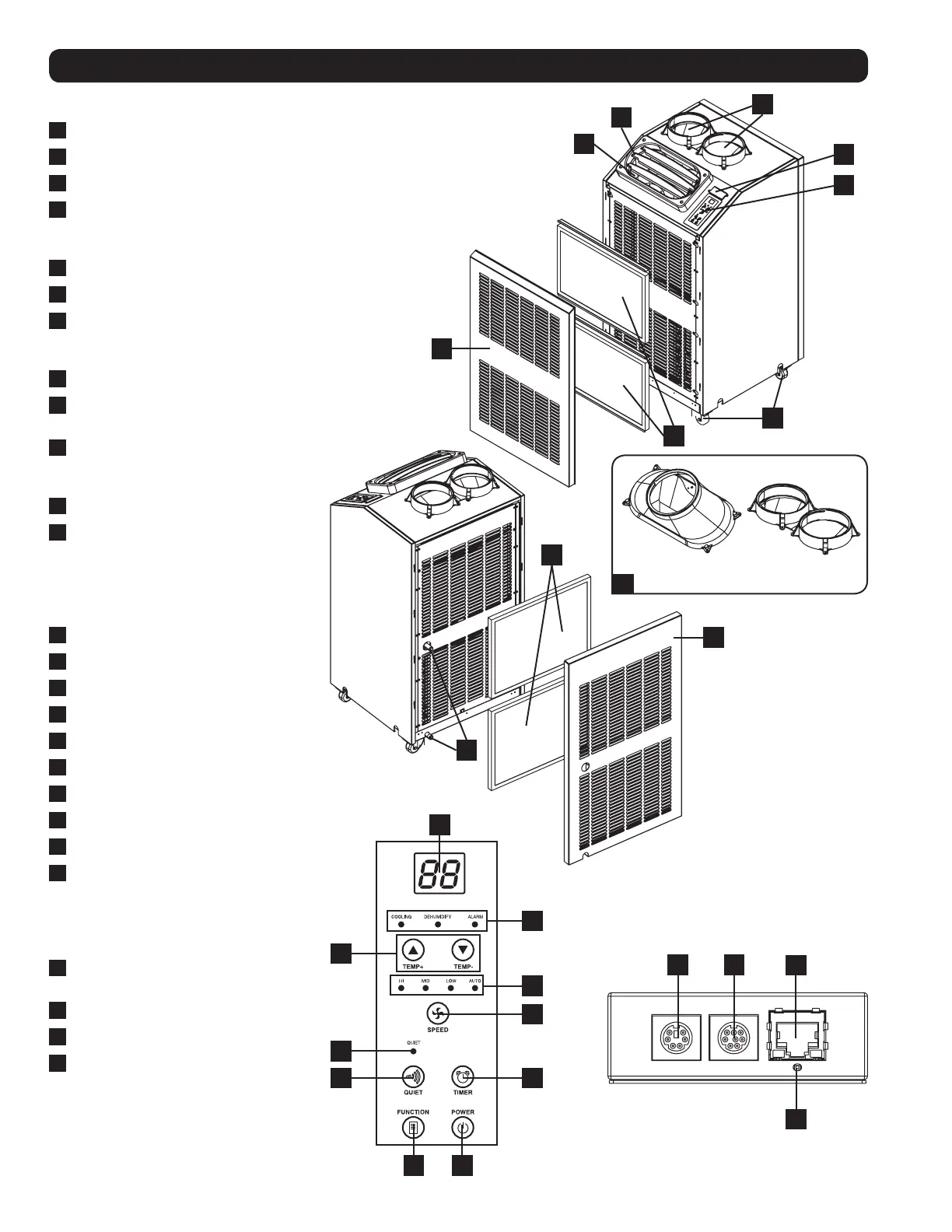
Features
SRCOOL18K/SRCOOL24K
A
Cool Air Output
B
Louvered Vent Insert (Pre-Installed)
C
Warm Air Exhaust
D
SNMP Accessory Slot*
* SNMP card pre-installed with
SRCOOL24K model
E
Control Panel
F
Casters
G
Condenser Filters
(Included – see Maintenance section
for filter replacement)
H
Front Panel
I
Cooling Duct Adapter
(Optional, Varies by Model)
J
Evaporator Filters
(Included – see Maintenance section
for filter replacement)
K
Rear Panel
L
Evaporator Drainage Outlets
Control Panel
M
Numeric Display
N
Operating Mode LEDs
O
Temperature Control Buttons
P
Fan Speed Mode LEDs
Q
“FAN SPEED” Button
R
“QUIET” LED
S
“QUIET” Button
T
“TIMER” Button
U
“FUNCTION” Button
V
“POWER” Button
SNMP Connections
(SRCOOL24K Only)
W
PS/2 Port (for use with ENVIROSENSE
accessory – included with SRCOOL24K)
X
Mini-DIN Serial Port
Y
RJ45 Ethernet Network Port
Z
SNMP Reset Button
Note: Use a pin, paper clip, or point tool to
access the recessed reset button. Do not
use excessive force when engaging the reset
button.
SRCOOL18K/SRCOOL24K
Front View
SRCOOL18K/SRCOOL24K
Rear View
Control Panel
SNMP Connections


 To Next Page