1
2
4
42U
3
Installation
Rack Enclosures
1
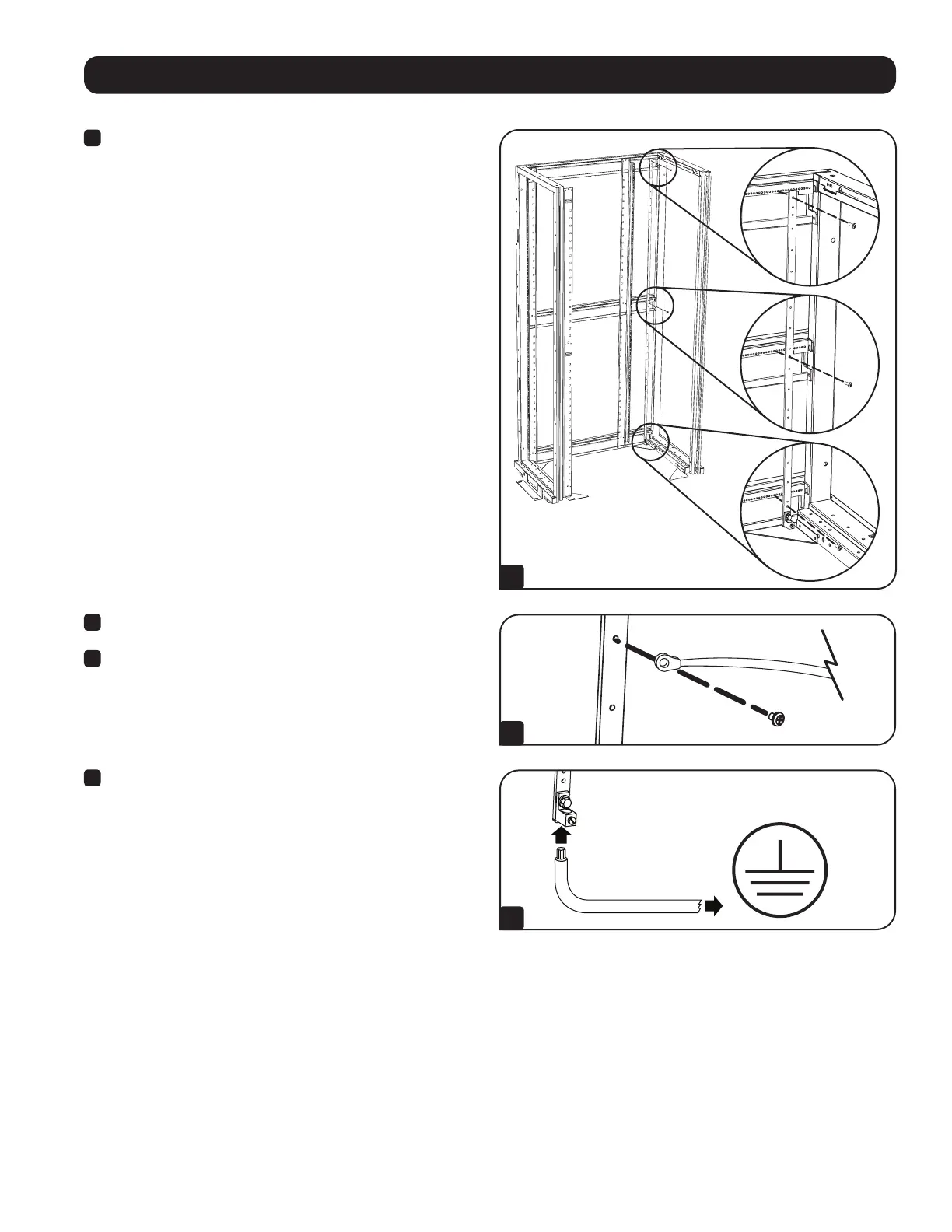
For a 42U enclosure, such as Tripp Lite’s SR42UB, attach the
SRGROUND to the 3 indexed horizontal beams at the top, middle
and bottom of the enclosure. The included M4 Self-Tapping
Screws will go through the three clearance holes (non-threaded)
on the bar, and then into the beams of the rack enclosure.
For a 48U enclosure, such as Tripp Lite’s SR48UB, attach the
SRGROUND to the top and middle horizontal beams only, as the
bar will not reach all the way down to the bottom beam.
For a 25U enclosure, such as Tripp Lite’s SR25UB, attach the
SRGROUND25 to the 2 indexed horizontal beams at the top
and bottom of the enclosure, using the top and second from
the bottom holes. The included M4 Self-Tapping Screws will go
through the two clearance holes (non-threaded) on the bar, then
into the beams of the rack enclosure.
For a 24U enclosure, such as Tripp Lite’s SR24UB, attach
the SRGROUND25 to cage nuts installed in the top and bottom
horizontal rails of the enclosure using the top and bottom holes
of the SRGROUND25.
Note: The instructions above are specific for mounting in Tripp Lite SR42UB,
SR48UB, SR24UB or SR25UB SmartRack™ Enclosures. Mounting in other
enclosure brands is possible, but will vary depending upon the application.
Several holes are provided along the grounding bar that will allow for a workable
installation into any brand’s rack configuration.
Note: Placement will vary and depend on your particular rack configuration. It is
recommended to measure the distance between the bar and your equipment to
accommodate the length of the Grounding Straps. Once the length you need has
been determined, attach the bar in the appropriate holes in the horizontal beams.
2
Attach one end of the Grounding Strap to the bar using the
included M4 screws and washers.
3
Attach the other end of the Grounding Strap to the grounding
provision on the intended equipment.
4
Finally, attach your facility’s system ground to the grounding lug at
the bottom of the bar. The lug can accommodate 2/0-14AWG wires.
FACILITY GROUND


 To Next Page