Operation Altimeter Product Manual
0286-SOM-00001, Issue: 09 27 © Tritech International Ltd.
within the unit, refer to Chapter 6, Configuration for more details of the correct
dip switch settings and supported modes.
Configuring Seanet Pro
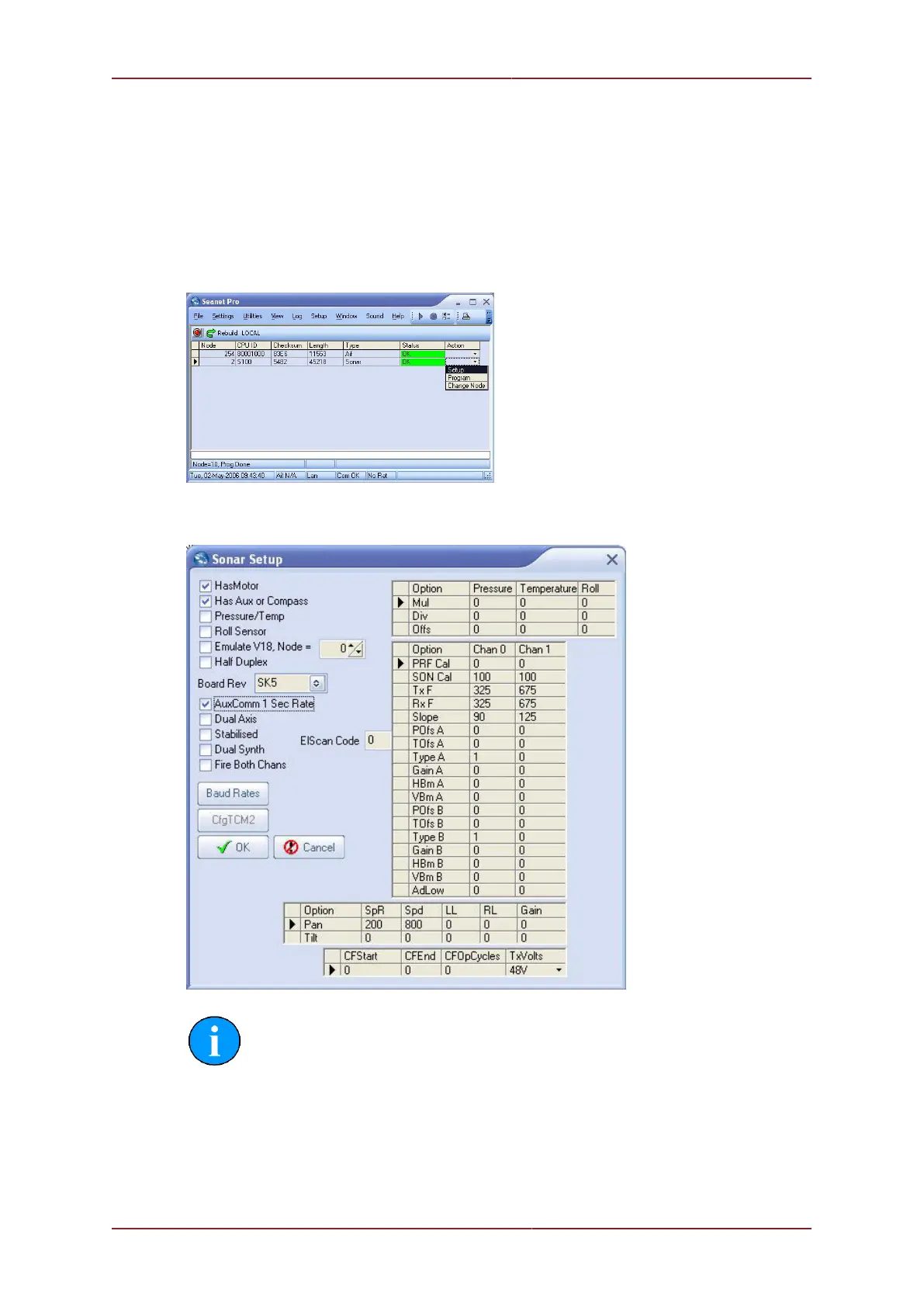
First launch the Seanet Setup application and ensure that Node 2 is detected in the table,
indicating that the SeaKing sonar head is visible to the computer. Click the Action column
for Node 2 and then select Setup.
In the sonar setup dialog which is presented, ensure that the Has Aux or Compass check
box is enabled.
Note
If the sonar is a V6 DST Super SeaKing or Super SeaPrince DST then the
AUX port is enabled continuously. A V6 can be identified by having a different
setup screen as shown below. For the Super SeaPrince DST the Comms Mode
selection is used to control the AUX port as well as the MAIN port so the protocol
and baud rates for the AUX port will need to be set correctly.


 To Next Page