[5]
PS3 XBOX
PC 1 PC 2
Game Vol Audio Source
XBOXVoice Vol
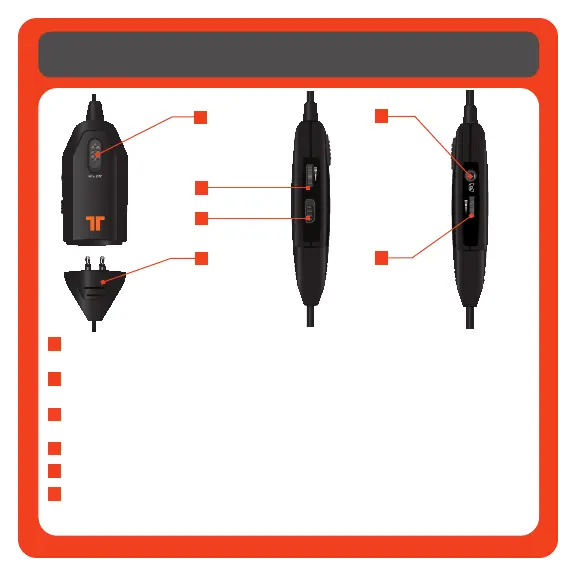
Mic Mute: Slide the mic mute switch down to mute the microphone so others
cannot hear you.
Master Volume and Mute: Use to adjust the master volume of game audio. Push in
to mute all game sound.
Xbox/PS3 Switch: Activates the headset’s microphone for use with corresponding
console.
Breakaway In-line Connector
Xbox LIVE Port: Use to connnect to Xbox LIVE.
Voice Communication Volume and SVM Control: Use to adjust the volume of the
voices of other players. SVM = Selectable Voice Monitoring. SVM allows the user
to hear his or her own voice through the headset. Push in to turn SVM ON/OFF.
In-line Controller
1
1
2
3
2
4
3
5
4
6
5
6
Downloaded from www.vandenborre.be


 To Next Page