Need help?
Do you have a question about the Tritton Trigger and is the answer not in the manual?
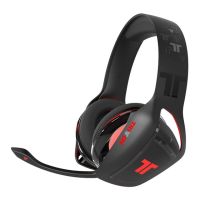
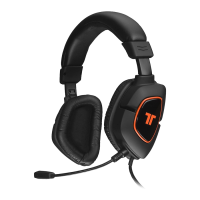
Contains the main headset unit with microphone.
Cable to connect the headset to the controller.
Adapter for analog audio connections.
Controller for adjusting audio settings.
Describes the adjustable headrail and earcup padding for comfort.
Details the flexible microphone for voice input.
Highlights the rotating earcups for adjustability.
Explains the on-ear design of the headset.
Control for adjusting game audio volume.
Control for adjusting chat audio volume.
Port for connecting the headset.
Connects the headset cable to the controller.
Switch to mute or unmute the microphone.
Connect the AV cable to the console.
Connect the USB Cable to a USB port on the Xbox 360.
Connect the RCA connection cable to the Xbox 360 AV Cable.
Connect the Headset Connector Cable in the proper order.
Steps to resolve issues when others cannot hear you.
Steps to resolve issues when you cannot hear others.
Insert the AAA into the AV port on the Xbox 360.
Connect the USB Cable to a USB port on the Xbox 360.
Connect the RCA connection cable to the AAA.
Connect the Headset Connector Cable in the proper order.
Steps to resolve issues with no audio in analog mode.
Register your product at TRITTONUSA.COM for coverage and updates.
Steps to try before returning the product to the store.
Details the terms and conditions of the 2-year limited warranty.
Steps required to receive warranty service.
Provides website, email, and phone contacts for support.
Lists important safety warnings and usage precautions.
Details FCC compliance and radio frequency exposure information.
Statement of compliance with EU directives.
 General
| Headset type | Binaural |
|---|---|
| Product type | Headset |
| Product color | Black |
| Wearing style | Head-band |
| Recommended usage | Gaming |
| Wireless range | 4 m |
| USB connectivity | Yes |
| Connectivity technology | Wired |
| Impedance | - Ω |
| Driver unit | 40 mm |
| Magnet type | Neodymium |
| Ear coupling | Supraaural |
| Headphone frequency | - Hz |
| Microphone type | Boom |


 To Next Page