[6]
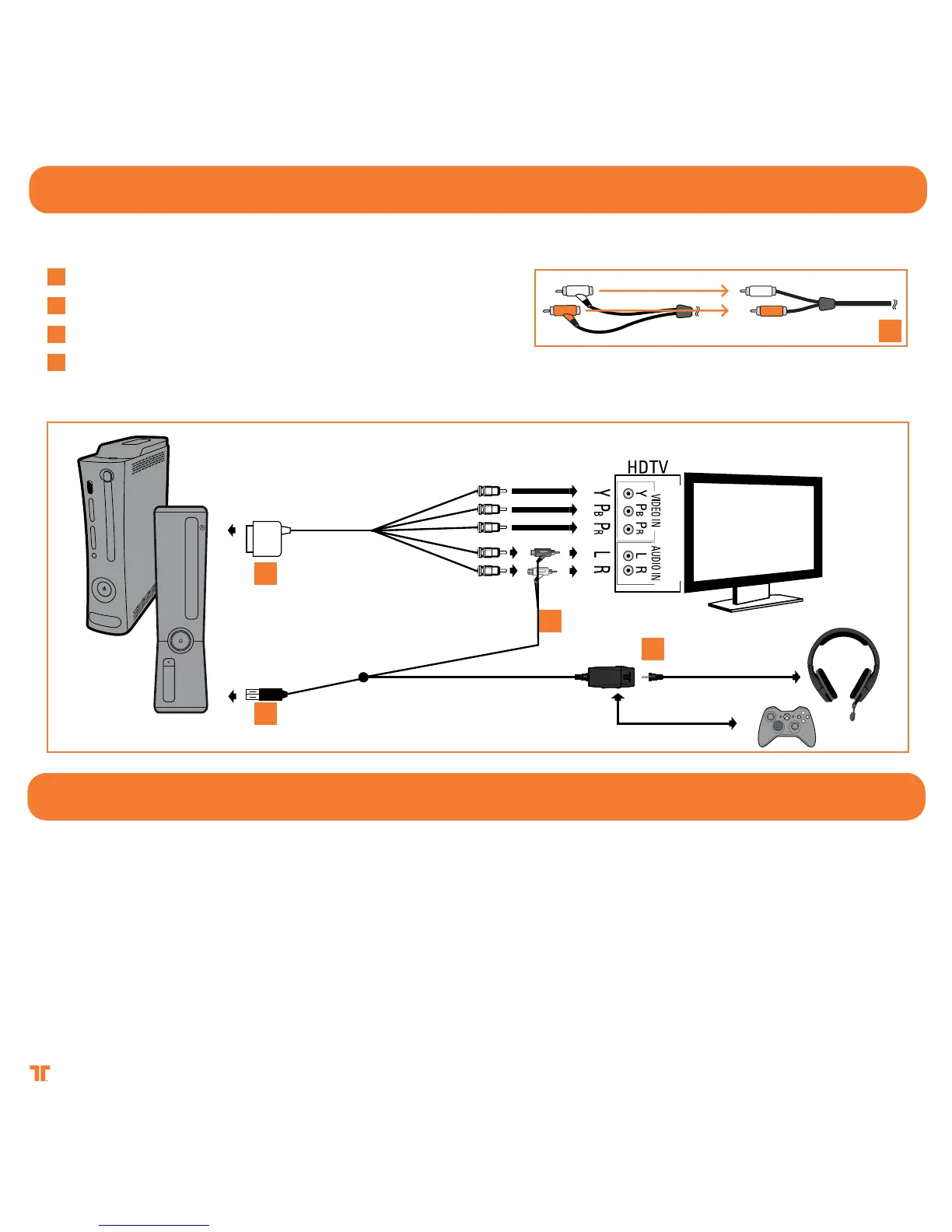
Ensure that TV/Monitor and Xbox 360 are powered OFF.
Connect the AV cable
* to the console.
Connect the USB Cable to a USB port on the Xbox 360.
Connect the RCA connection cable to the Xbox 360 AV Cable.
Be sure to connect the Headset Connector Cable in the proper order:
1 - Connect Headset Connector Cable to the Headset Connector Port on the in-line controller.
2 - Connect puck side of Headset Connector Cable into Xbox 360-compatible controller.
XboX 360 - comPonent / Vga / comPosIte
[ ]
3
[ ]
1
[ ]
2
[ ]
3
[ ]
4
XboX 360 - lIVe
Troubleshooting:
If others cannot hear you:
• Make sure the microphone is not muted.
• Make sure the Headphone Connector Cable is plugged in properly.
If you cannot hear others:
• Press the Xbox Guide Button when a game is loaded, and go to Personal Settings >Voice. Ensure that “Headset only” is selected.
• Make sure the Headphone Connector Cable is plugged in properly.
[ ]
1
[ ]
2
[ ]
3
[ ]
4
*not included



 To Next Page