CONTROL BOX OPERATION
Press "ON/OFF" to activate the scorer.
Scoreboard "HOME" shows "01" (pre- set game 1).
Press "SELECT UP and DOWN" to select a game.
Press "SELECT UP and DOWN" to enter selected game mode.
Press "SOUND" to switch sound ON/OFF while playing.
Press "PAUSE" to pause or start time counting.
Press and hold the button "ON/OFF" 3 seconds to turn off scorer.
Press and hold the button "RESET" 3 seconds to reset the games.
Note: If no shot is made or no button i
s pressed in 15 minutes, scorer will be turned off automatically.
ON/ OFF
PLAY
SELECT
UP
SELECT
DOWN
SOUND
PAUSE
RESET
CONTROL PANEL
P15
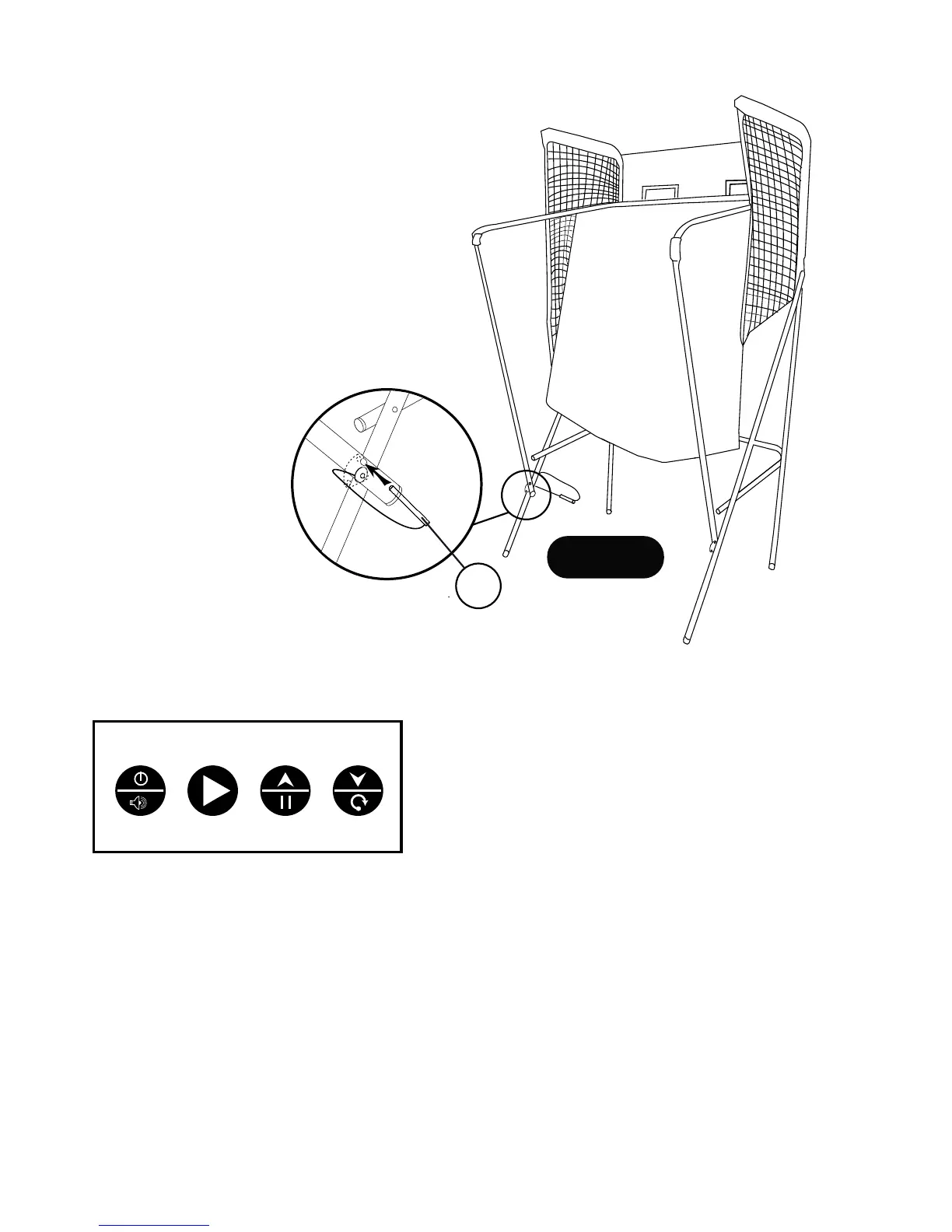
FIGURE 12
STORAGE POSITION
To fold the basketball game into the storage position,
remove P15 Locking Pins from the playing position.
Lift the front ramp chute until the game is in the storage
position as shown in FIGURE 12.
Then, insert the P15 Locking Pins back into the lower
tube to lock the basketball game into storage position.
13
For Customer Service Call 1-888-996-2729
© 2016 Escalade S por t s
All Rights Reserved.


 To Next Page