Directinventorydefaultexportformat:B.44.N.13
Usually, the format of wireless transmission to a computer is a barcode + carriage return.
However, some special applications may require 2 carriage returns or various special symbols.
Suchacomplexoutputformatcanbesetinabarcodeexportformat.
Settheformatas
follows:Atotaloffourspecialkeywords,respectively,
with A, B, N and points marked, A that the local number (set in the
wirelesssettings),Bbarcode,Nsaidthenumberofpoints,‐127isthe
ASCIIvalueofthecharacter,suchasthedefaultB.13thattheoutput
is
a barcode + carriage return; B.13.13 barcodeplus 2 carriagereturns;
A.58.B.13thattheoutputisthemachinenumber+:+Barcode+Enter,
58 is the colon ASCII value; 126.B.126.N.13 then said the output ~
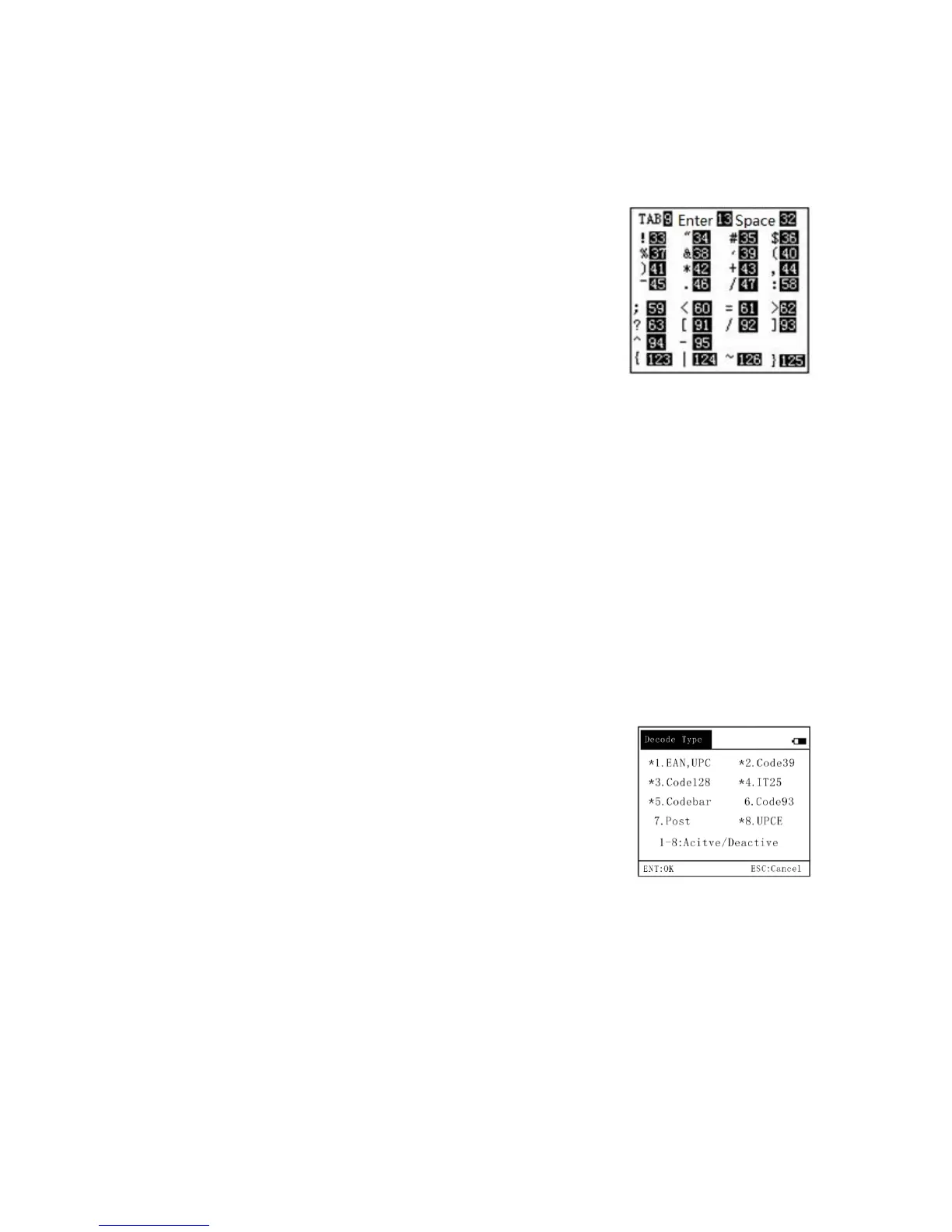
barcode~numbercarriagereturn,126is~ASCIIvalue.CommonASCII
codeas
shownontheright.
6,System
Note: Enter some important settings need to enter the password, the default password is
13579
(1,systeminformation:somebasicinformationsystem
(2, the system settings: including bar code settings, volume, automatic standby time, charging
andotherimportantsettings
(3,wirelesssettings:wirelesscommunicationsrelatedsettings
(4, update the
application: PDT handheld support upgrade application updates through this
menuitemtoenter,youneedadedicatedPC‐sideupdatesandUSBdrivers.
(5,switchtoEnglishversion:switchChineseinterface
Thefollowingdetailssystemsettings
(1, set the bar code parameters: including decoding type setting, effective length setting,
decodingoptionssettingfunction.
barcodeidentificationsettings(setthedecodingtype)
The barcode recognition setting is used to set the barcode type
supported by the PDT wireless barcode collector. The picture on the
right shows the barcode type identification setting interface. The
barcodetypewith*inthefigure
indicatesthatthistypeofdecodinghas
been activated and this type of barcode can be scanned; the barcode
typewithout*indicatesthatdecodingisdisabled.Figure,Code93code,
postalcode without *, that these two bar codes can not be PDT read. Press the corresponding
numberkeyto
openorclose.
effectivebarcodelengthsetting:
Thelengthofthevalidbarcodeindicatesthelengthofthebarcodethatisallowedtobeoutput.
The default value is 1‐50, indicating any length (the maximum barcode of the PDT wireless
scanner is 50 digits). Users can set single,
multiple or multiple ranges of valid barcode lengths.
Such as the input 13 thatonly allows 13‐bit bar code output; 8.13.15 that only allow 8,13 and
15‐bitbarcodeoutput.15‐18indicatesthattheallowedlengthofthebarcodeis15,16,17,18four.
8.10.13‐16that8,10,13,14,15,16these
sixbarcodelengthtooutput.
Settheautomaticshutdowntime:thedefaultis180seconds,thatis,within3minutesdonot



 To Next Page
 Loading...