EN 7
air cleaner AirgoClean® 200 E
Operation
Note
Avoid open doors and windows.
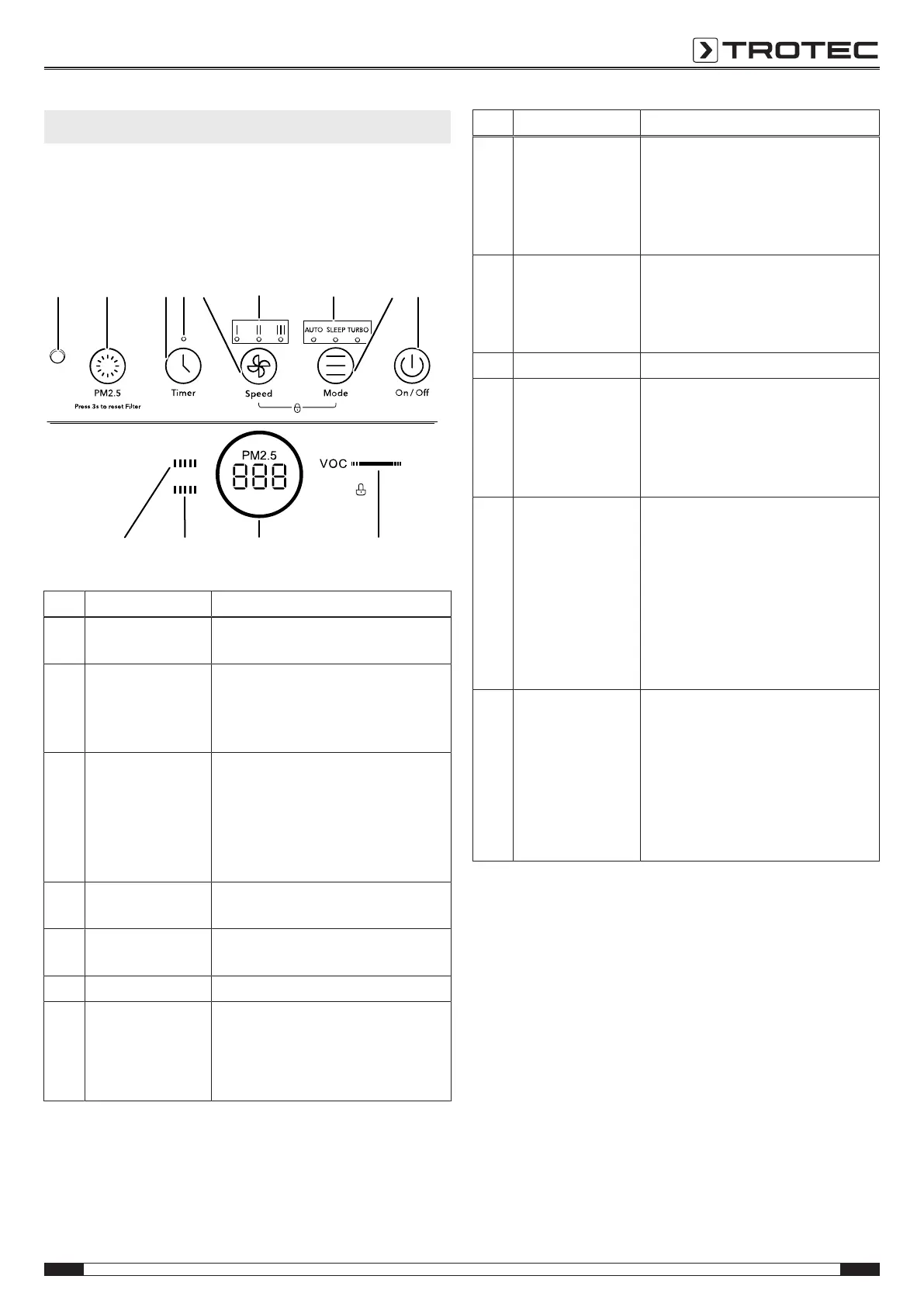
Control panel
8 9 10 11 1312 15 16
17
5
18
19
14
No. Designation Meaning
5 Segment display Indicates the measured air quality
and the time when a timer is set
8 Light sensor The light sensor detects when the
surroundings are dark.
The device switches to night mode if
automatic mode is selected.
9 Air quality button Briefly press the button to measure
the air quality.
Press the button for 3seconds if you
want to reset the HEPA carbon filter
LED(18) or Prefilter LED(19) after a
filter change.
10 Timer button Switching on the timer function:
12h, 24h, 48h, 72h
11 Timer LED Illuminated when the timer is
activated
13 Speed LED Indication of the selected fan speed
12 Speed button Setting the fan speed in 3stages:
• I = stage1
• II = stage2
• III = stage3
No. Designation Meaning
14 Mode LED Illuminated according to the selected
operating mode:
• Auto LED = automatic mode
• Sleep LED = night mode
• Turbo LED = turbo mode
15 Mode button Selecting the operating mode:
• Automatic mode
• Night mode
• Turbo mode
16 On/Off button Switching the device on and off
17 Air quality LED Is illuminated according to the air
quality:
• blue= good
• orange= medium
• red= poor
18 HEPAcarbon filter
LED
If the Replace indication is
illuminated and the last bar of the
LED is illuminated in red, the
HEPAcarbon filters need to be
replaced.
The individual bars indicate the
degree of contamination. The higher
the degree of pollution, the fewer
bars are displayed.
19 Prefilter LED If the Clean indication is illuminated
and the last bar of the LED is
illuminated in red, the prefilters need
to be cleaned.
The individual bars indicate the
degree of contamination. The higher
the degree of pollution, the fewer
bars are displayed.
Switching the device on
Once you have completely installed the device as described in
the Start-up chapter, you can switch it on. When the power
cable has been connected, the segment display lights up briefly
and an acoustic signal is emitted. Afterwards, the device is in
standby mode.
Please proceed as follows to switch the device on:
1. Press the On/Off button(16).
ð The segment display is illuminated.
ð The AutoLED(14) is illuminated. The device is now in
automatic mode.
ð The device measures the air quality within10seconds.
The segment display(5) and the Air quality LED(17) are
illuminated in blue, orange or red depending on the air
quality. The measured air quality is indicated on the
segment display(5).


 To Next Page