EasyManua.ls Logo

Trotec AIRGOCLEAN 200 E - User Manual

Trotec AIRGOCLEAN 200 E
15 pages
Print Icon
To Next Page IconTo Next Page
Loading...
TRT-BA-AIRGOCLEAN®200E-TC2020-53-004-EN
AIRGOCLEAN
®
200 E
EN
OPERATING MANUAL
AIR CLEANER
Question and Answer IconNeed help?

Do you have a question about the Trotec AIRGOCLEAN 200 E and is the answer not in the manual?

Summary

Safety

Safety Warnings and Symbols

Defines safety symbols (Warning, Caution, Note) and general safety advice.

General Usage Safety

Instructions on safe operation, child safety, and device placement.

Electrical and Placement Safety

Electrical and Placement Safety

Safety checks for power, cables, placement, and obstructions.

Intended Use and Misuse

Guidelines on proper use, prohibited actions, and user qualifications.

Residual Risks and Emergency Behavior

Electrical Voltage and Suffocation Warnings

Details specific risks related to electrical voltage, suffocation, and proper handling.

Emergency Procedures

Steps to follow in case of an emergency, including power disconnection.

Device Description

Core Functionality and Features

Explains the air purification process, filter types, and key features.

Operating Modes and Control

Describes available modes, sensors, and the control panel.

Device Depiction

Front and Rear Views

Illustrates the device's front and rear with labeled components.

Transport and Storage

Safe Transport Guidelines

Instructions for safely moving the device, including pre-transport checks.

Proper Storage Conditions

Details on how to store the device when not in use to prevent damage.

Assembly and Start-up

Scope of Delivery and Unpacking

Lists included items and provides steps for unpacking the device.

Initial Setup and Connection

Guides on positioning, cable checks, and connecting the power cable.

Operation

Control Panel Overview

Details the function of each button, LED, and display on the control panel.

Switching the Device On

Step-by-step instructions for powering on the device and initial status.

Operating Modes

Automatic Mode and Air Quality

Explains automatic mode, air quality sensing, and its limitations for virus filtration.

Night Mode and Turbo Mode

Details how to activate and the functions of night and turbo modes.

Fan Speed and Timer Settings

Instructions for adjusting fan speed and setting the automatic shut-off timer.

Control Functions

Automatic Switch-Off and Lock Function

How to set the timer for automatic shutdown and activate the control panel lock.

Memory Function and Shutdown

Information on saved settings and procedures for safely shutting down the device.

Available Accessories

Lists recommended accessories and warns against using unauthorized ones.

Errors and Faults

Troubleshooting Device Startup Issues

Steps to resolve problems when the device fails to start or operates loudly.

Addressing Reduced Capacity and Air Quality

Solutions for issues like reduced performance, poor air quality, or obstructions.

Interpreting Error Codes and Indicators

Explains error messages (E1, E0, E3) and indicator lights for filters and air quality.

Maintenance

Maintenance Intervals Overview

Schedule for checking and cleaning air inlets, outlets, filters, and the exterior.

Maintenance and Care Log

A logbook to record maintenance activities performed on the device.

Cleaning and Filter Replacement

Safety Precautions for Maintenance

Essential safety steps before performing any maintenance tasks.

Cleaning the Device Housing and Sensor

Instructions for cleaning the exterior housing and the air quality sensor.

Visual Inspection of the Interior

Guidance on checking the inside of the device for dirt and dust accumulation.

Changing the HEPA Carbon Filter

HEPA Filter Replacement Procedure

Step-by-step guide for removing old HEPA filters and installing new ones.

Resetting Filter Indicators

How to reset the filter replacement LEDs after changing the filters.

Cleaning the Pre-Filters

Prefilter Cleaning Instructions

Detailed steps for cleaning the pre-filters, including drying and reinsertion.

Post-Maintenance Actions

Steps to take after maintenance, either to resume use or for storage.

Technical Annex and Disposal

Technical Data Specifications

Lists key technical parameters such as airflow, power, dimensions, and weight.

Disposal Information

Guidance on environmentally sound disposal of the equipment and its components.

Overview

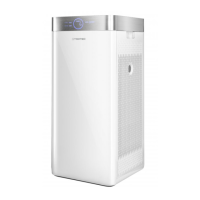
The AirgoClean® 200 E is an air cleaner designed to filter room air, reducing slight to medium contaminations and odors to improve air quality. It features a powerful fan that draws air in from the front, passes it through a multi-stage filter system, and then releases clean air back into the room.

Function Description

The device utilizes a 2-in-1 filter system on each side, comprising a HEPA and carbon filter, along with a separate prefilter on each side. The prefilters, made of synthetic fiber, capture large dust particles before the air reaches the HEPA filters. The HEPA filters are effective against bacteria, viruses, pollen, dust mite residue, mold fungus spores, and other allergens. Integrated carbon filters, with activated carbon, are responsible for removing odors, cigarette smoke, smog, and particles that can carry smells and viruses.

An integrated air quality sensor allows the device to display the current air quality and automatically control air purification. It offers three operating modes: automatic, night, and turbo mode. In turbo mode, the device also includes a fully automatic ionization function, which disinfects room air using negative ions. The fan has four stages, including turbo mode, and filter changes are designed to be uncomplicated and quick. The device is compact, making it easy to transport, and operates with low noise, suitable for indoor use. A control panel and digital display facilitate operation and function control.

Important Technical Specifications

  • Model: AirgoClean® 200 E
  • Max. air flow rate with HEPA carbon filter: 524 m³/h
  • Ambient temperature: -10 °C to 45 °C
  • Operating range: 10% to 95% RH
  • Mains connection: 220-240 V / 50 Hz
  • Power consumption: 38 W
  • Nominal current: 0.17 A
  • Sound pressure level: 54 dB(A)
  • Dimensions (length x width x height): 310 x 310 x 680 mm
  • Minimum distance to walls and other objects:
    • Top: 30 cm
    • Rear: 30 cm
    • Side: 30 cm
    • Front: 30 cm
  • Weight: 10.5 kg
  • HEPA carbon filter efficiency: 99.97 %

Usage Features

The device is designed for ease of use with several features:

  • Control Panel: A segment display (5) shows measured air quality and timer settings. A light sensor (8) detects dark surroundings, automatically switching to night mode if automatic mode is selected.
  • Air Quality Button (9): Briefly pressing this button measures air quality. Holding it for 3 seconds resets the HEPA carbon filter LED (18) or Prefilter LED (19) after a filter change.
  • Timer Button (10): Activates an automatic switch-off function, allowing settings for 12 h, 24 h, 48 h, or 72 h. A Timer LED (11) indicates when the timer is active.
  • Speed Button (12): Adjusts the fan speed in three stages (I, II, III). A Speed LED (13) indicates the selected fan speed.
  • Mode Button (15): Selects between automatic, night, and turbo operating modes. A Mode LED (14) illuminates according to the selected mode.
  • On/Off Button (16): Switches the device on and off.
  • Air Quality LED (17): Illuminates blue (good), orange (medium), or red (poor) depending on air quality.
  • HEPA Carbon Filter LED (18): When illuminated red with the last bar, indicates that HEPA carbon filters need replacement. Individual bars show the degree of contamination.
  • Prefilter LED (19): When illuminated red with the last bar, indicates that prefilters need cleaning. Individual bars show the degree of contamination.
  • Automatic Mode: The device automatically detects air quality and adjusts fan speed. The segment display shows the PM2.5 value (0-75 blue, 76-150 orange, >150 red).
  • Night Mode: Operates at the lowest fan stage with minimal noise, suitable for sleep. Air quality measurement and LED are not activated.
  • Turbo Mode: Runs at the highest fan stage, with automatic ionization for disinfection. Air quality LED and segment display show PM2.5 values.
  • Locking Function: Simultaneously pressing the Speed and Mode buttons for 3 seconds activates a locking function, preventing accidental button presses. Repeating the action deactivates it.
  • Memory Function: Saves selected operating mode and fan speed settings when the device is switched off and back on from standby. Timer settings are not saved.
  • Transport: Equipped with a carry handle and wheels for easy movement on level surfaces.

Maintenance Features

Regular maintenance is crucial for optimal performance and longevity.

  • Filter Check: Air inlets and outlets should be checked for dirt and foreign objects and cleaned as needed (before every start-up, at least every 2 weeks, or as needed).
  • Exterior Cleaning: The exterior should be cleaned with a soft, damp, lint-free cloth (at least every 2 weeks). Avoid aggressive cleaners or solvents.
  • Internal Inspection: Visually check the inside of the device for dirt (at least every 4 weeks). If a thick layer of dust is present, clean with a vacuum cleaner.
  • Filter Cleaning/Replacement:
    • Prefilter: Clean the prefilter (20) when the Prefilter LED (19) illuminates red. Remove the prefilter, clean it with a slightly damp, soft, lint-free cloth, or warm water with a neutral cleaning agent if heavily contaminated. Allow it to dry completely before reinserting. Reset the Prefilter LED by holding the Air quality button (9) for 3 seconds.
    • HEPA Carbon Filter: Replace the HEPA carbon filters (21) when the HEPA carbon filter LED (18) illuminates red. These filters cannot be cleaned. Remove the air inlet (3), pull the strips (22) to remove the old filter, dispose of it according to regulations, and insert a new filter, ensuring the strips are on the outside. Reset the HEPA carbon filter LED by holding the Air quality button (9) for 3 seconds.
  • Damage Check: Check the device for damage (before every start-up).
  • Attachment Screws: Check attachment screws (before every start-up).
  • Test Run: Perform a test run (annually).
  • Air Quality Sensor Cleaning: Clean the air quality sensor from the outside with a soft, damp, lint-free cloth if required.
  • Storage: When not in use for a considerable time, store the device dry, protected from frost and heat, in an upright position, and covered to protect against dust and direct sunlight.

Trotec AIRGOCLEAN 200 E Specifications

General IconGeneral
BrandTrotec
ModelAIRGOCLEAN 200 E
CategoryAir Cleaner
LanguageEnglish

Related product manuals