Operation
-------------------
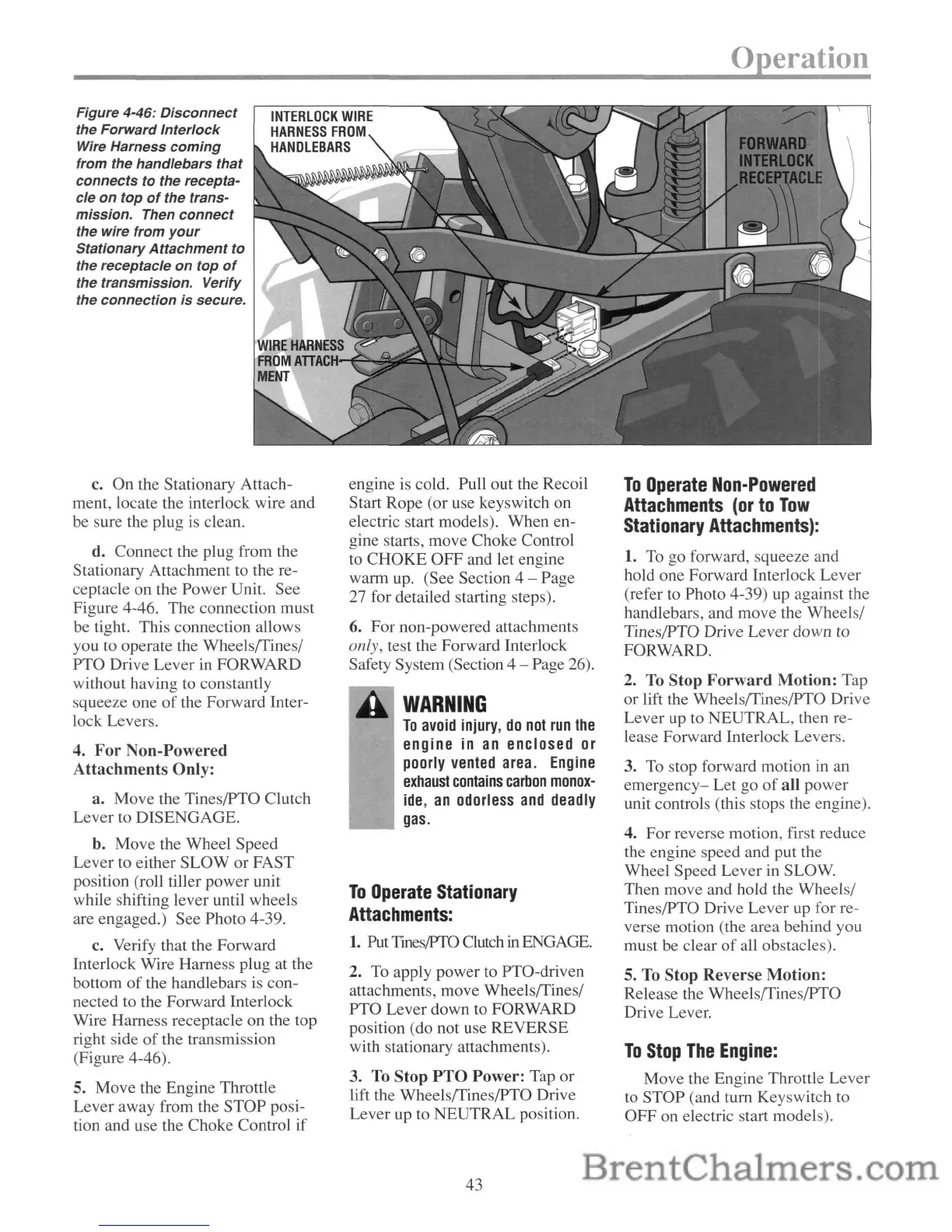
Figure 4-46:
Disconnect
the Forward Interlock
Wire Harness
coming
from the handlebars that
connects
to the recepta-
cle
on
top
of
the trans-
mission. Then
connect
the wire from
your
Stationary
Attachment
to
the receptacle
on
top
of
the transmission. Verify
the connection is secure.
INTERLOCK
WIRE
HARNESS
FROM
HANDLEBARS
c.
On
the Stationary Attach-
ment, locate the interlock wire and
be sure the plug is clean.
d.
Connect
the plug from the
Stationary Attachment to the re-
ceptacle
on
the
Power
Unit. See
Figure 4-46.
The
connection
must
be tight. This connection allows
you to operate the WheelsfTines/
PTO Drive
Lever
in FORWARD
without having to constantly
squeeze one
of
the Forward Inter-
lock Levers.
4.
For
Non-Powered
Attachments
Only:
a.
Move
the Tines/PTO Clutch
Lever
to
DISENGAGE.
b. Move the
Wheel
Speed
Lever
to either
SLOW
or
FAST
position (roll tiller
power
unit
while shifting lever until wheels
are engaged.) See Photo 4-39.
c. Verify that the Forward
Interlock Wire Harness plug at the
bottom
of
the handlebars is con-
nected to the Forward Interlock
Wire Harness receptacle on the top
right side
of
the transmission
(Figure 4-46).
5. Move the Engine Throttle
Lever
away from the
STOP
posi-
tion and use the Choke Control
if
engine is cold. Pull out the Recoil
Start
Rope
(or use keyswitch on
electric start models).
When
en-
gine starts, move Choke Control
to
CHOKE
OFF
and let engine
warm up. (See Section 4
- Page
27 for detailed starting steps).
6.
For
non-powered attachments
only, test the Forward Interlock
Safety System (Section 4 - Page 26).
WARNING
To
avoid
injury,
do
not
run
the
engine in
an
enclosed
or
poorly
vented
area.
Engine
exhaust
contains
carbon
monox-
ide,
an
odorless
and
deadly
gas.
To
Operate
Stationary
Attachments:
1.
Put
Tmes/PTO
Clutch
in
ENGAGE.
2. To apply power to PTO-driven
attachments,
move
WheelsfTines/
PTO
Lever
down to FORWARD
position (do not use
REVERSE
with stationary attachments).
3. To
Stop
PTO
Power:
Tap
or
lift the WheelsfTines/PTO Drive
Lever up to
NEUTRAL
position.
43
To
Operate
Non-Powered
Attachments
(or
to
Tow
Stationary
Attachments):
1. To go forward, squeeze and
hold one Forward Interlock
Lever
(refer to Photo 4-39) up against the
handlebars, and
move
the Wheels/
Tines/PTO Drive
Lever
down
to
FORWARD.
2. To
Stop
Forward
Motion:
Tap
or
lift the WheelsfTines/PTO Drive
Lever up to NEUTRAL, then re-
lease Forward Interlock Levers.
3. To stop forward motion in an
emergency-
Let
go
of
all
power
unit controls (this stops the engine).
4.
For
reverse motion, first reduce
the engine speed and put the
Wheel Speed
Lever
in SLOW.
Then move and hold the Wheels/
Tines/pTO Drive
Lever
up for re-
verse motion (the area behind you
must be clear
of
all obstacles).
5. To
Stop
Reverse
Motion:
Release the WheelsfTines/PTO
Drive Lever.
To
Stop
The
Engine:
Move the Engine Throttle
Lever
to
STOP
(and
tum
Keyswitch to
OFF
on electric start models).


 To Next Page
 Loading...