EasyManua.ls Logo

True 600 Series - Control Panel Overview; Control Panel Window Displays; Control Panel Functions and Keys

True 600 Series
13 pages
Print Icon
To Next Page IconTo Next Page
To Previous Page IconTo Previous Page
Loading...
2-1
Control Panel
And
Window Displays
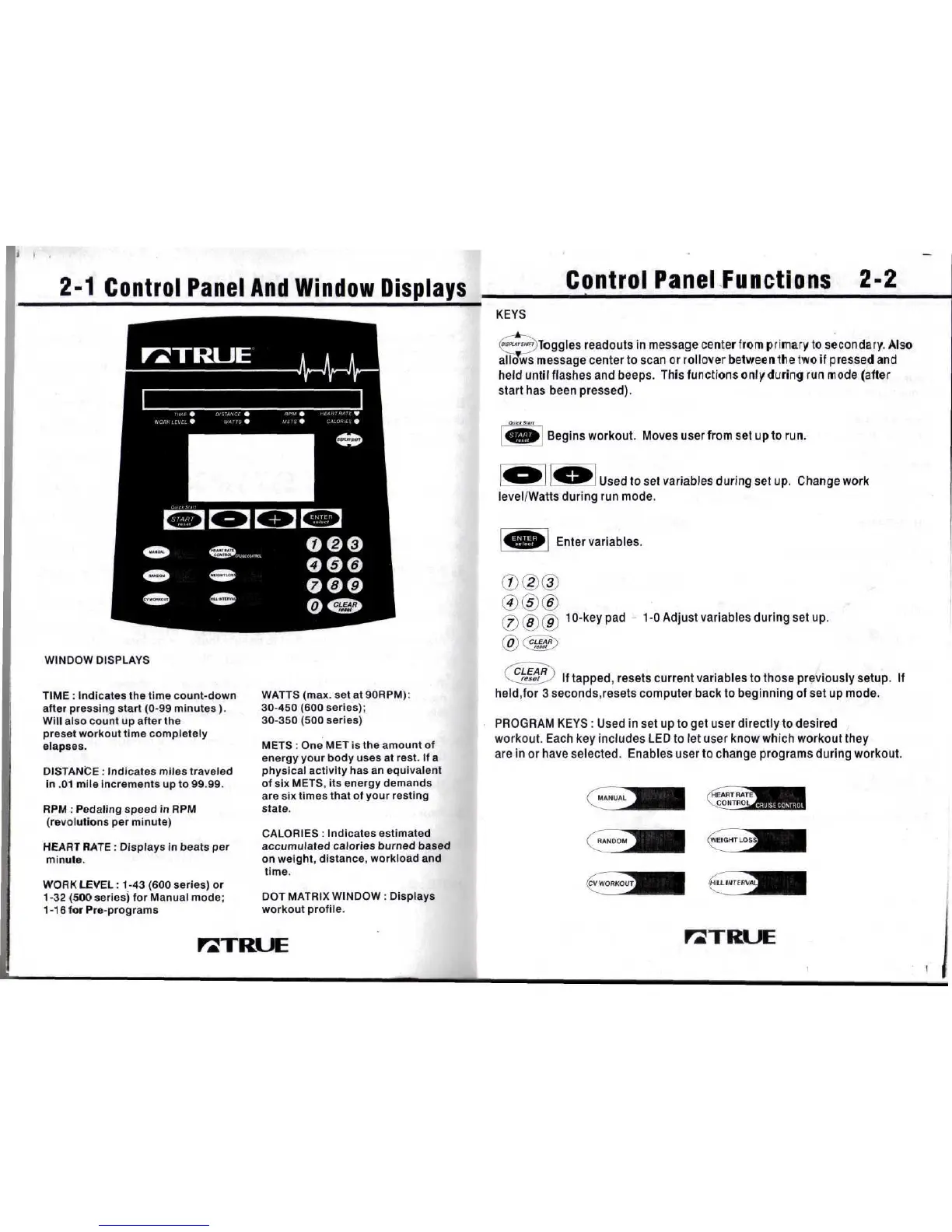
WINDOW DISPLAYS
TIME
:
Indicates
the
time count-down
after
pressing start
(0-99
minutes).
Will
also count
up
after
the
preset
workout time completely
elapses.
DISTANCE
:
Indicates
miles
traveled
in
.01
mile increments
up to
99.99.
RPM
:
Pedaling
speed
in
RPM
(revolutions
per
minute)
HEART RATE
:
Displays
in
beats
per
minute.
WORK
LEVEL
:
1-43
(600
series)
or
1 -32
(500
series)
for
Manual
mode;
1-16
for
Pre-programs
WATTS
(max.
set at
90RPM):
30-450
(600
series);
30-350
(500
series)
METS
: One MET is the
amount
of
energy your body uses
at
rest.
If a
physical
activity
has an
equivalent
of
six
METS,
its
energy demands
are six
times that
of
your resting
state.
CALORIES
:
Indicates estimated
accumulated
calories
burned
based
on
weight, distance, workload
and
time.
DOT
MATRIX WINDOW
:
Displays
workout
profile.
Control
Panel
Functions
2-2
KEYS
readouts
in
message center
from
primary
to
secondary.
Also
allws
message center
to
scan
or
rollover
betweenlrie
two if
pressed
and
held
until
flashes
and
beeps. This functions
only
during
run
mode
(alter
start
has
been pressed).
Begins
workout.
Moves
user
from
set
upto
run.
I
Used
to set
variables during
set up.
Change work
level/Watts
during
run
mode.
Enter
variables.
(7) (5) (9)
1
°-
ke
yP
acl
~ 1-0
Adjust variables during
set
up.
(Q\
(CLEAR^)
\
v
/
V_
reset
J
If
tapped,
resets
current variables
to
those previously
setup,
tf
held,for
3
seconds,resets
computer back
to
beginning
of set up
mode.
PROGRAM
KEYS
:
Used
in set up to get
user
directly
to
desired
workout. Each
key
includes
LED to let
user know which workout they
are
in or
have
selected. Enables user
to
change programs during workout.
MANUAL
RANDOM
(CV
WORKOUT
FZTRUE
rZTRUE

Related product manuals