CHAPTER 2: ASSEMBLY INSTRUCTIONS
BIKE ASSEMBLY STEPS (continued):
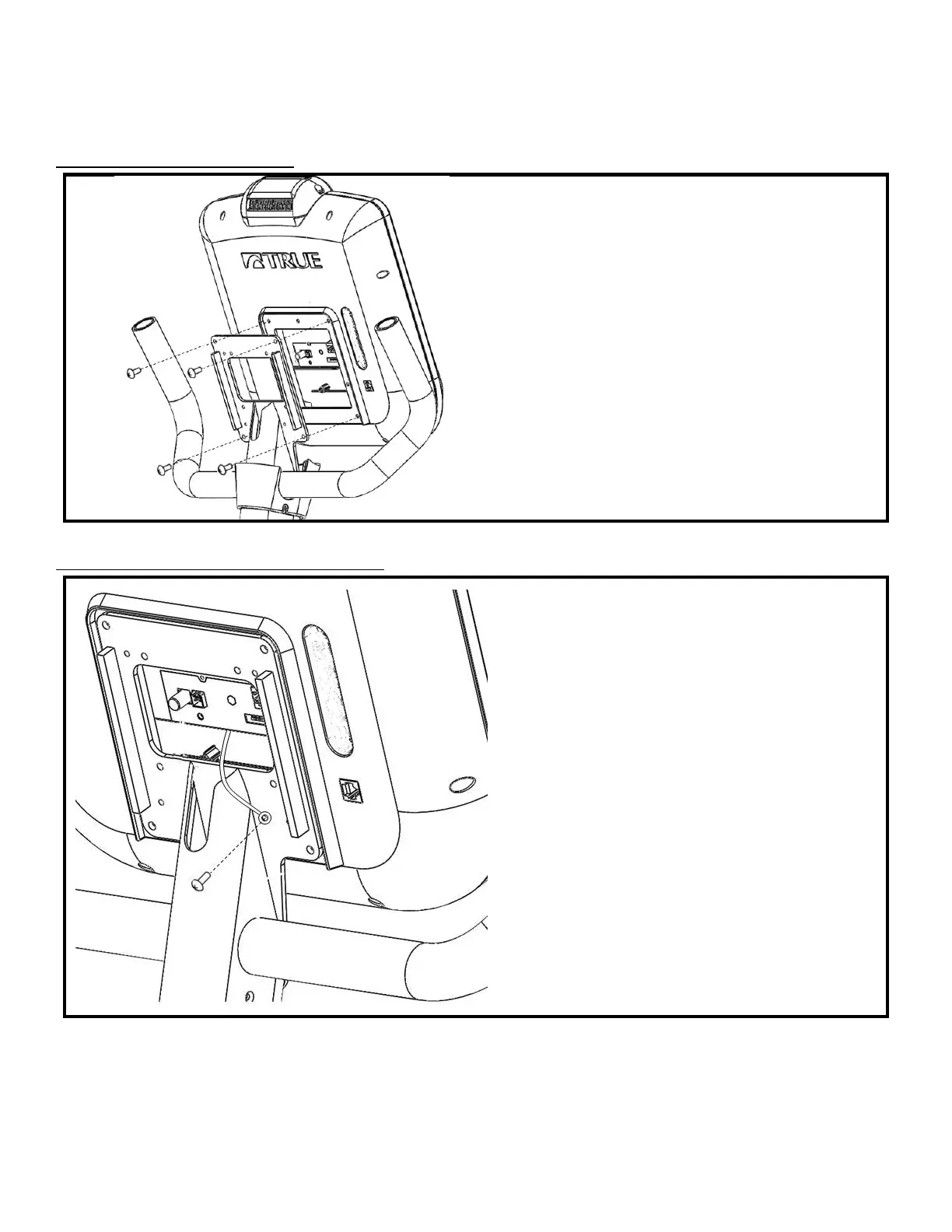
Step 13 Console Mounting:
• The fasteners used to attach the Console are
provided in the Console packaging
• Align the back of the Console with the Front
Mast Console Mounting Plate
• Attach the Console to the Mounting Plate by
tightening all 4 screws with a Phillips head
screwdriver (not provided)
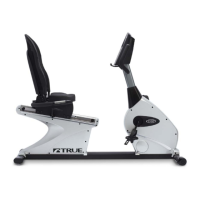
Step 14 Grounding Wire Connection:
• Locate the Ground Screw; pre-installed into the
Front Mast Mounting Plate
• Remove the Ground Screw with a Phillips head
screwdriver (not provided)
• Insert the shaft of the Ground Screw through
the metal ring attached to the green Console
Ground Wire
• Re-attach the Ground Screw to the Front Mast
Mounting Plate
• Verify that the metal Ground Ring is
compressed between the head of the Ground
Screw and the Front Mast Mounting Plate
Truefitness.com / 800.426.6570 / 636.272.7100 15


 To Next Page