Truefitness.com / 800.426.6570 / 636.272.7100
16
CHAPTER 2: ASSEMBLY INSTRUCTIONS
BIKE ASSEMBLY STEPS
(continued):
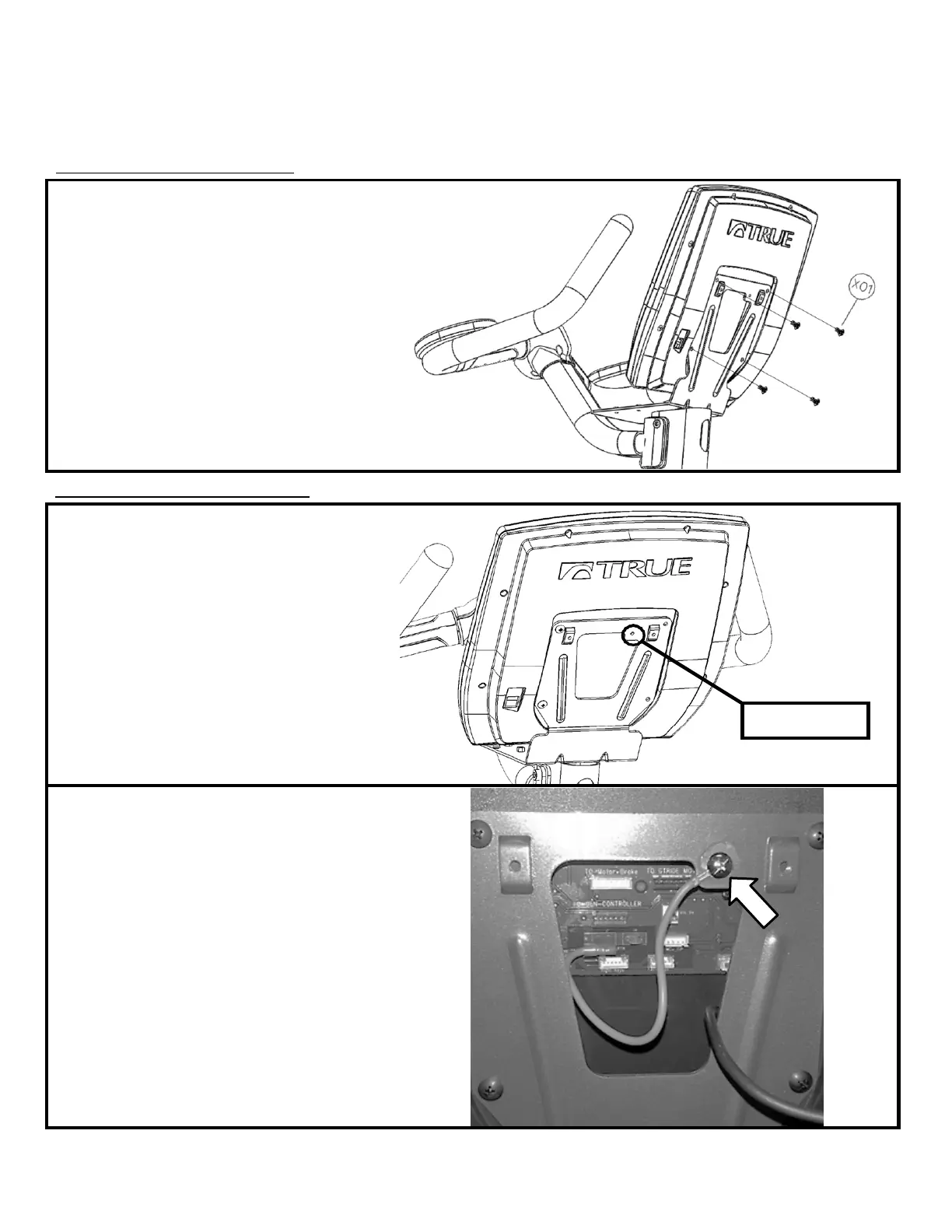
Step #9 Console Mounting:
a) Align the back of the Console with the Front
Mast Console Mounting Plate
b) Attach the Console to the Mounting Plate by
tightening all 4 screws with a Phillips head
screwdriver (not provided).
Hardware Required:
*Included with console.
Step #10 Cable Connections :
a) Locate the groud screw; pre-installed into
the back of the Front Mast Mounting Plate
b) Remove the ground screw with Phillips head
screwdriver (not provided)
Ground Screw
c) Thread the shaft of the ground screw
through the metal ring attached to the console
Ground Wire
d) Re-attach the ground screw to the Front
Mast Mounting Plate
e) Verify that the metal ground ring is
compressed between the head of the ground
screw and the Front Mast Mounting Plate


 To Next Page