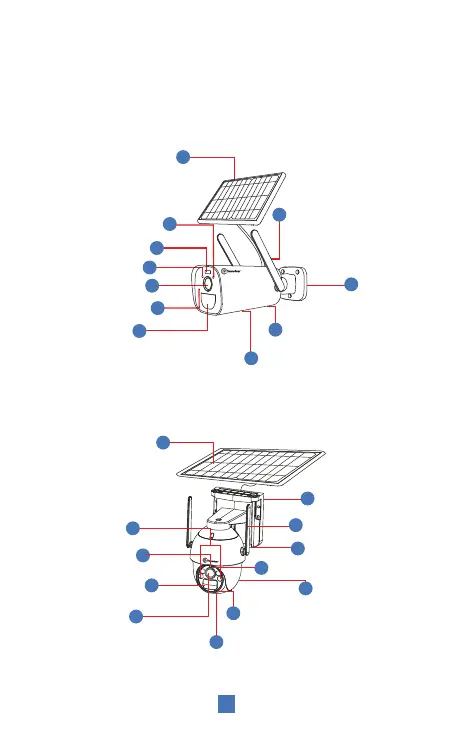
Reset Button - SD Card Slot -
USB Charging Port
Solar Panel
Indicator Light
Lens
Photosensitive
4
1
11
7
8
6
3
MIC
Antenna
9
5
10
Base
2
Human Infrared
Sensor (PIR)
Speaker
Note:
1. Connect the camera to the solar panel and confirm that the solar
panel switch is ON.
2. Turn ON the camera switch.
3. Dial the solar panel switch to "ON" to turn on and "OFF" turn off.
2
(*Note: Please open the speaker cover when using the reset button / SD cardslot.)
Power output
Indicator Light
Lens
Infrared & Spot Light
Speaker
Reset Button - 4G Card Slot - SD Card Slot
4
12
7
2
1
3
MIC
Antenna
Solar Panel
11
9
5
10
Base
8
6
Human Infrared
Sensor (PIR)
Photosensitivity
Sensor
T1
T18132


 To Next Page