5
Product features
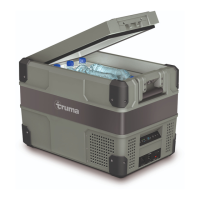
Fig. 1
1
2
3
4
5
6
7
8
9
10
11
12
13
1 Powered by 12 / 24VDC compressor
2 Two way opening lid
(not Model C36 / C44)
3 Bottle openers on both sides
4 Flat carry and tie down handles
5 Digital display for each compartment
(only dual zones)
6 Multi-voltage system AC (100-240V)
and DC (12 / 24V) - DC inlet on two ends
7 USB port and charger with 3A
8 Stylish robust corners for protection
9 LED interior light
10 Divided compartment storage
11 Fully refrigerated stepped compartment
12 Headroom for upright standing bottles
13 Bluetooth App for mobile use
Control panel Single Zone
(C30 / C36 / C44 / C60 / C73 / C105)
1 2 3 4 5 6 7
Turbo
Fig. 2
Control Panel Dual Zone
(C69 DZ / C96 DZ)
1 2 3 4 5 6 7
Turbo
Fig. 3
1 Power switch
2 Turbo switch
3 Power indicator / Fault light
4 Turbo indicator light
5 LED-Display
6 Switch compartments / Mode
7 Temperature settings
Turning the appliance on/off
• Plug in the AC or the DC power cable. If
the appliance does not start automatically,
press the power switch to turn on the appli-
ance. The LED display on the control panel
will turn on and the interior temperature is
displayed.
• Press the power switch for three seconds to
switch off the appliance.
The system will remember the previous set-
tings when power is off. If the power sup-
ply is cut off or disconnected, the appliance will
switch off automatically and once the power
supply is restored it will automatically switch
back on.
Operating instructions



 To Next Page