5
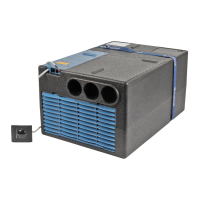
IR receiver and manual on / off
There is an additional pushbutton on the receiver (m), with
which the unit can also be switched on and off without the
remote control (e.g. with a ballpoint pen).
If the unit is switched on using this pushbutton, the system is
automatically reset to the factory settings (Automatic mode,
22 °C).
IR receiver / operating indicator
m
LED 1
LED 2
LED 3
LED 1 blue – permanently on – (cooling mode)
LED 1 blue – flashing – (cooling mode compressor start-up)
LED 2 yellow – permanently on – (heating mode)
LED 2 yellow – flashing – (heating mode compressor start-up)
LED 3 red – flashing – (data is being transmitted)
LED 3 red – permanently on – (fault)
Red LED illuminates
The unit is indicating a fault. Switch unit off, wait for a short
time and switch on again. If the red LED continues to illumi-
nate, please contact Domestic Service.
Taking into operation
Before switching on, it is essential to make sure that the fuse
system for the power supply at the camp site is sufficient
(230 V / minimum 6 A).
In order to prevent the power cable for the caravan
from overheating (minimum cross-section 3 x 2.5 mm²)
the cable drum must be fully unwound.
To carry out the individual switching commands, the remote
control must always be pointed at the infrared receiver.
Before switching on for the first time, the remote control must
be paired with the IR receiver.
– Insert batteries in the remote control (note polarity)
– Symbol flashes
– Press set-up button 2 times and hold
– When the red LED in the IR receiver flashes, release the set-
up button
– When the set-up symbol disappears, the remote control is
paired with the receiver.
Switching on
Press the “On / Off switch” on the remote control to switch
on the air conditioning unit. The most recent settings are
applied.
After switching on, the air circulation fan starts to run.
The compressor activates after a maximum of 3 minutes,
and the blue (cooling) / yellow (heating) LED flashes.
Temperature
If required, adjust the room temperature setting using the “+”
and “–” “Temperature selection buttons”.
Mode
Select the required operating mode by pressing the “MODE”
button one or more times.
– Cooling
– Heating
– Automatic (heating or cooling mode depending on the room
temperature setting)
– Circulated air
When the room temperature that was selected using the
remote remote control is reached in cooling mode, the com-
pressor switches off and the blue LED in the IR receiver goes
out. The air circulation fan continues to run in order to provide
ventilation. If the room temperature setting is exceeded, the
device automatically reverts to cooling mode.
When the room temperature that was selected using the re-
mote control is reached in heating mode, the compressor
switches off and the yellow LED in the IR receiver goes out.
The air circulation fan continues to run in order to provide ven-
tilation. If the temperature drops below the room temperature
setting, the device automatically reverts to heating mode.
Heating is not possible where the outside temperature is
less than 4 °C. Between 4 °C and 7 °C the device briefly
switches to thawing processes. Heating is possible without
restrictions above 7 °C.
Cooling/heating mode and the fan level are selected automati-
cally depending on the room temperature when the unit is in
automatic mode.
In recirculated air mode, the interior air is circulated and
cleaned by the filters. No LED‘s illuminate on the IR receiver.
Fan
Select the required fan level by pressing the “Fan level” but-
ton one or more times.
– Fan level (not operational in automatic mode)
–Low
– Medium
– High
Sleep function
When the “Sleep function” is active (cooling mode only) the
fans operate at slow speed and therefore extremely quietly.
Switching off
Press the “On / Off” button on the remote control to switch
the equipment off.
If the air conditioning unit is switched on again, the blue /
yellow LED flashes. The air circulation fan runs and the
compressor switches itself on after a maximum of 3 minutes.
Time
Press the “Time selection button” and set the current time
using the “Time setting” buttons.
The time is always shown in the display.
The time must be reset after a battery change or daylight sav-
ing time change.



 To Next Page
 Loading...