Speed
control
Balancing
action control
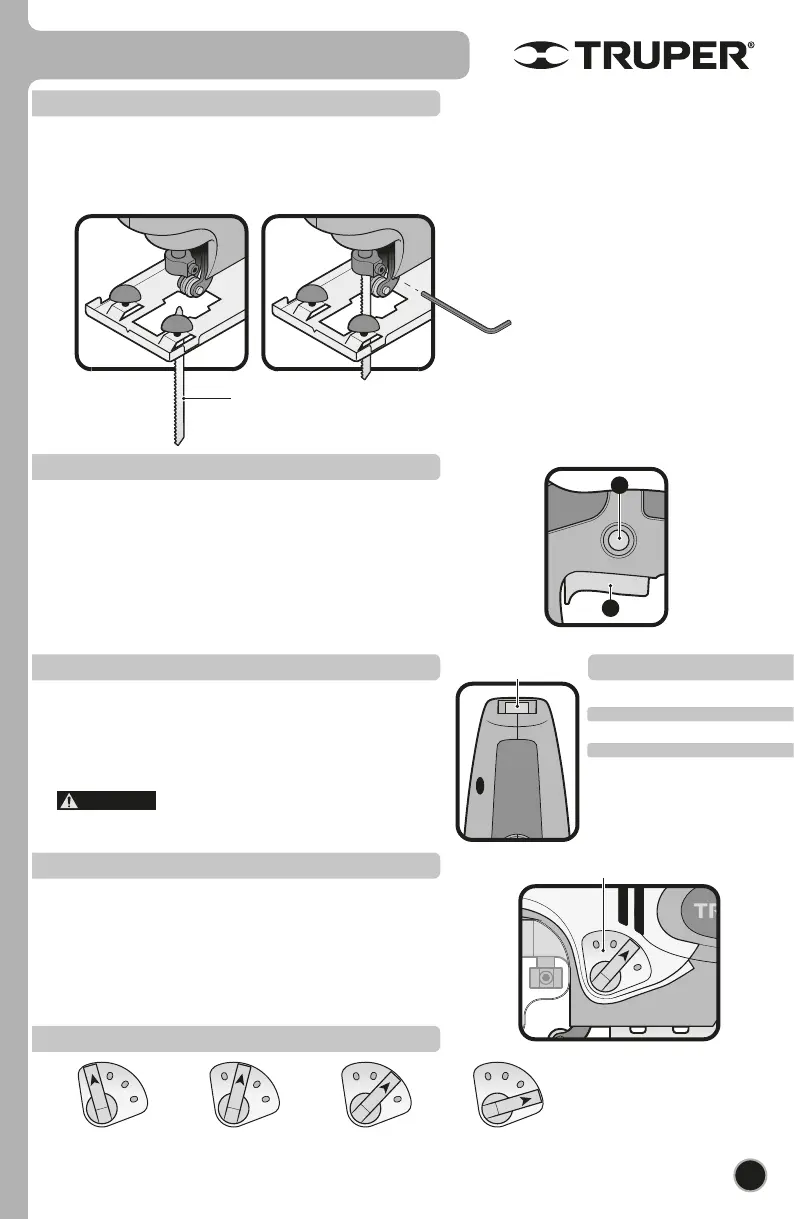
Blade set up
• The opening of the blade support should be free of sawdust.
• Loosen the installation screws with the Allen key included.
• Insert the blade all the way in the blade support. The backside of the blade should be set into the roller guide slot.
• Tighten firmly the installation screws. Vibration might make them get loose. Check the blade regularly; if loose tighten the
installation screws.
Speed control Speed guide
• The tool can operate at different speeds. You can select the speed
by adjusting the speed control into the tool upper side.
• Adjust speed with the speed control according to the material, its
width and the blade specification (it is possible to do this when
running without load). See the speed guide to select the right speed
for the job.
• Avoid running at low speed for long periods. The
motor might be damaged.
Starting and operation control
• Intermittent Operation:
Connect t he plug into the outlet.
Press the switch (F) to start up the tool.
To stop the tool, simply release the switch.
• Continuous operation:
Connect the plug into the outlet.
Press the switch (F) and block it pressing the continuous use button (G).
To stop the tool, press and release the switch.
7
Start up
• The balancing action varies the cutting angle of the blade to
increase cutting efficiency, It can also be adjusted while
operating with no load. To get more details see the Selection
Table for the Balancing Action. Do not apply excessive force over
the blade when cutting with the balancing action. The blade only
cuts when traveling upwards
.
Balancing action control
Diagram for balancing action selection
Material Speed
rubber
aluminum
steel
wood
1-3
4-5
4-6
6
This jig saw uses T-shank
blade. To get better cutting
results make sure to use the
adequate blade for the
material and cut to be made.
Thin material. Fine
cuts. Close curves.
Thick material (steel
and chipboard)
Thick material (wood
and plastic)
Fast cuts (soft wood)
Cutting along the wood grain.
G
F
WARNING
ENGLISH



 To Next Page