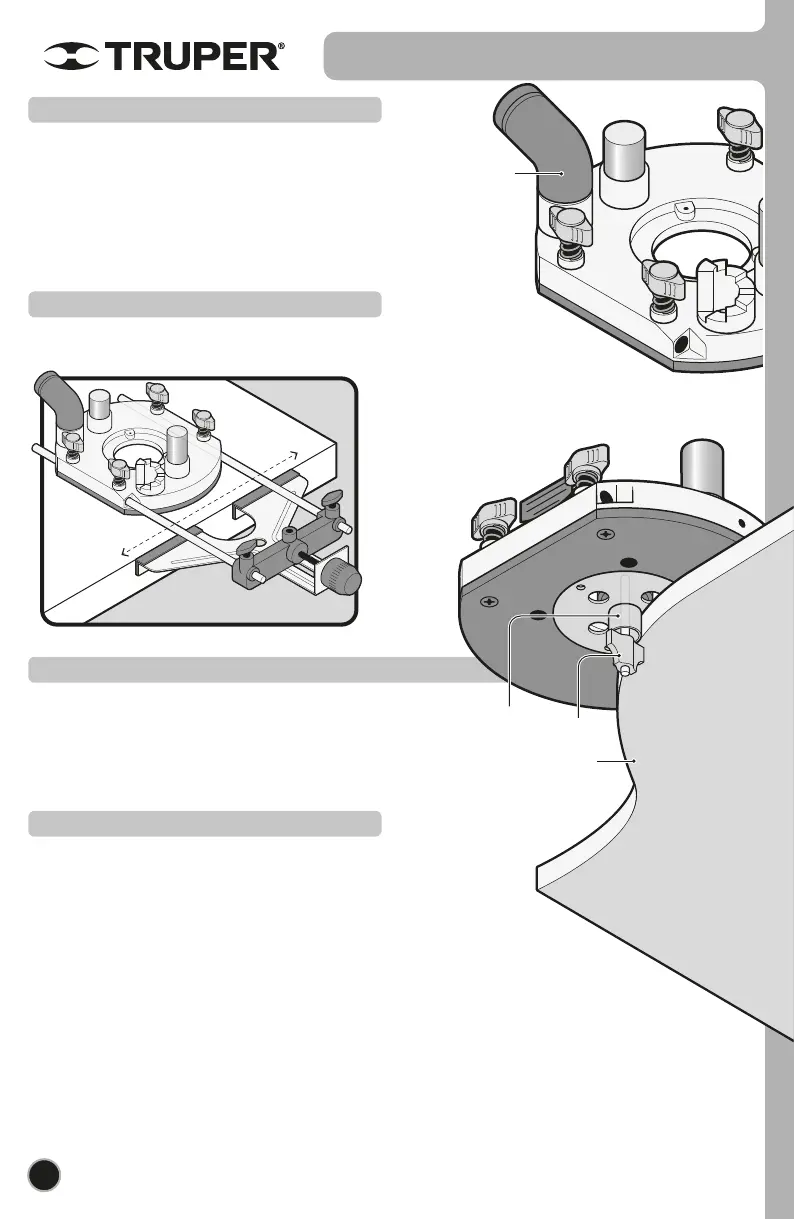
Template
Bit
Copying
guide bushing
Dust
extraction
connector
8
Start Up
• The dust extraction connector use with an external vacuum cleaner is
useful to get rid of dust from the worktable.
• Connect the dust extractor (as indicated in “Dust Extractor
Installation”, page 6).
• Insert the dust extraction connector into the corresponding orifice in
the router base. Slide into the hose of a domestic vacuum cleaner. Use
an adapter if necessary.
Dust extraction connector
• Fix the parallel guide into the router base (page 6) and support it
onto the work piece edge to make straight cuts.
Parallel guide use
• Fix the Copying guide onto the router base (page 6).
• Use a template between the router base and the work piece.
• Support the copying guide bushing on the template edge. Make the
cut following the template shape.
Copying guide use
• This tool is specifically designed to work on wood and plastic.
• For deeper cutting depths make various superficial cuts with gradual
increments.
• Before turning on the router set the machine base on the work piece.
• Guide the machine in a constant speed through the work piece. Do
not apply pressure on the bit.
• Give time to the machine in order to cut the work piece.
• When cutting along edges double-check you are guiding the tool
counterclockwise to the bit rotation. Otherwise the tool may shoot out
unexpectedly.
• Do not operate the tool upside down, this condition will affect its
performance.
Additional advise
ENGLISH


 To Next Page