EasyManua.ls Logo

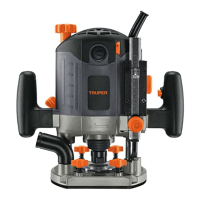
Truper ROU-N3 - User Manual

Truper ROU-N3
24 pages
Go to English
Print Icon
To Next Page IconTo Next Page
Loading...
Instructivo de
Rebajadoras
ROU-N3 / ROU-NX2
Modelos Código
ROU-N3
ROU-NX2
Este instructivo es para:
16610
16611
Potencia
1
800 W1
200 W
ROU-N3 ROU-NX2
Lea este instructivo por completo
antes de usar la herramienta.
ATENCIÓN
ESPAÑOL
ENGLISH
Question and Answer IconNeed help?

Do you have a question about the Truper ROU-N3 and is the answer not in the manual?

Summary

Technical Data

Power Requirements

Details on electrical specifications, voltage, current, and extension cord usage.

General Power Tool Safety Warnings

Work Area and Personal Safety

Guidance on maintaining a clean workspace and personal protective measures.

Electrical Safety Precautions

Warnings and advice on safe electrical connections and handling.

Tool Usage and Care Safety

Instructions for safe operation, maintenance, and storage of power tools.

Safety Warnings for Routers

Bit and Router Operation Safety

Key safety guidelines for installing bits and operating the router correctly.

Router Parts Identification

Assembly and Installation

Dust Extractor Installation

Optional steps for attaching the dust extractor to the router.

Copying Guide Installation

Optional steps for installing the copying guide for template work.

Bit Installation and Replacement

Procedure for installing, removing, and replacing router bits and chucks.

Parallel Guide Installation

Steps to install and adjust the parallel guide for straight cuts.

Router Start Up and Operation

Depth Stop Adjustment

How to set and adjust the depth stop for precise cuts.

Cut Depth Adjustment

Procedure for setting and fine-tuning the cutting depth.

Quick Cut Depth Selection

Utilizing pre-set depth positions for faster adjustments.

On;Off and Operation Controls

Instructions for starting, stopping, and continuous operation modes.

Bit Speed Adjustment

How to adjust the router bit speed for different materials.

Router Usage Guidance

Dust Extraction Connector Use

Connecting and using the dust extraction system.

Parallel and Copying Guide Usage

Instructions for using parallel and copying guides for accurate cuts.

Additional Operation Advice

Tips for working with wood/plastic, cutting depths, and guiding the tool.

Maintenance and Service

Routine Maintenance Checks

Ensuring vent slots are clear and guides are clean and lubricated.

Authorized Service Center

Information on where and how to get the tool serviced.

Carbon Brush Replacement

Steps and precautions for replacing worn carbon brushes.

Authorized Service Centers

Branches and Warranty Policy

Warranty Policy Details

Overview of the three-year warranty coverage, exclusions, and terms.

Summary

Technical Data

Power Requirements

Details on electrical specifications, voltage, current, and extension cord usage.

General Power Tool Safety Warnings

Work Area and Personal Safety

Guidance on maintaining a clean workspace and personal protective measures.

Electrical Safety Precautions

Warnings and advice on safe electrical connections and handling.

Tool Usage and Care Safety

Instructions for safe operation, maintenance, and storage of power tools.

Safety Warnings for Routers

Bit and Router Operation Safety

Key safety guidelines for installing bits and operating the router correctly.

Router Parts Identification

Assembly and Installation

Dust Extractor Installation

Optional steps for attaching the dust extractor to the router.

Copying Guide Installation

Optional steps for installing the copying guide for template work.

Bit Installation and Replacement

Procedure for installing, removing, and replacing router bits and chucks.

Parallel Guide Installation

Steps to install and adjust the parallel guide for straight cuts.

Router Start Up and Operation

Depth Stop Adjustment

How to set and adjust the depth stop for precise cuts.

Cut Depth Adjustment

Procedure for setting and fine-tuning the cutting depth.

Quick Cut Depth Selection

Utilizing pre-set depth positions for faster adjustments.

On;Off and Operation Controls

Instructions for starting, stopping, and continuous operation modes.

Bit Speed Adjustment

How to adjust the router bit speed for different materials.

Router Usage Guidance

Dust Extraction Connector Use

Connecting and using the dust extraction system.

Parallel and Copying Guide Usage

Instructions for using parallel and copying guides for accurate cuts.

Additional Operation Advice

Tips for working with wood/plastic, cutting depths, and guiding the tool.

Maintenance and Service

Routine Maintenance Checks

Ensuring vent slots are clear and guides are clean and lubricated.

Authorized Service Center

Information on where and how to get the tool serviced.

Carbon Brush Replacement

Steps and precautions for replacing worn carbon brushes.

Authorized Service Centers

Branches and Warranty Policy

Warranty Policy Details

Overview of the three-year warranty coverage, exclusions, and terms.

Truper ROU-N3 Specifications

General IconGeneral
Current9.4 A
Input power1200 W
Power sourceAC
AC input voltage127 V
AC input frequency60 Hz
Product colorBlack, Grey, Orange
Collet diameter- mm
Idle speed (max)9000 RPM
ManualYes
Package typeBox
Weight and Dimensions IconWeight and Dimensions
Weight4000 g