1312
Air Inlet
360°
Air changed 2 times per hr
750 ² (70 m²)
Air Delivery Type
PureDirect
™
Sensor
SensorPod
™
, works up to 49 (15 m) from purifier
Fan Speed Settings
Whisper, 1, 2, 3, Turbo
Purification Levels
Washable Prefilter, Carbon, True HEPA, UV
Timer Settings
2, 4, 8, 12 hr
Filter Change Indicators
Carbon, HEPA, UV
Noise
32 - 66 dB
Dimensions
10.3" x 10.4" x 28.6" (263 x 263 x 726 mm)
Weight
12.6 lbs (5.7 kg)
Motor Type
DC motor
Power Requirements
220-240V 50/60Hz 0.5A
Power Consumption
120 W
Warranty
2 years
Replacement Filters & UV Bulb
3-in-1 HEPA drum filter
AFHZ300001AU
Carbon filter (3-pack)
AFCZ300001AU
UV Bulb
UVLZ300001AU
SPECIFICATIONS CARE & MAINTENANCE
REPLACING HEPA FILTER
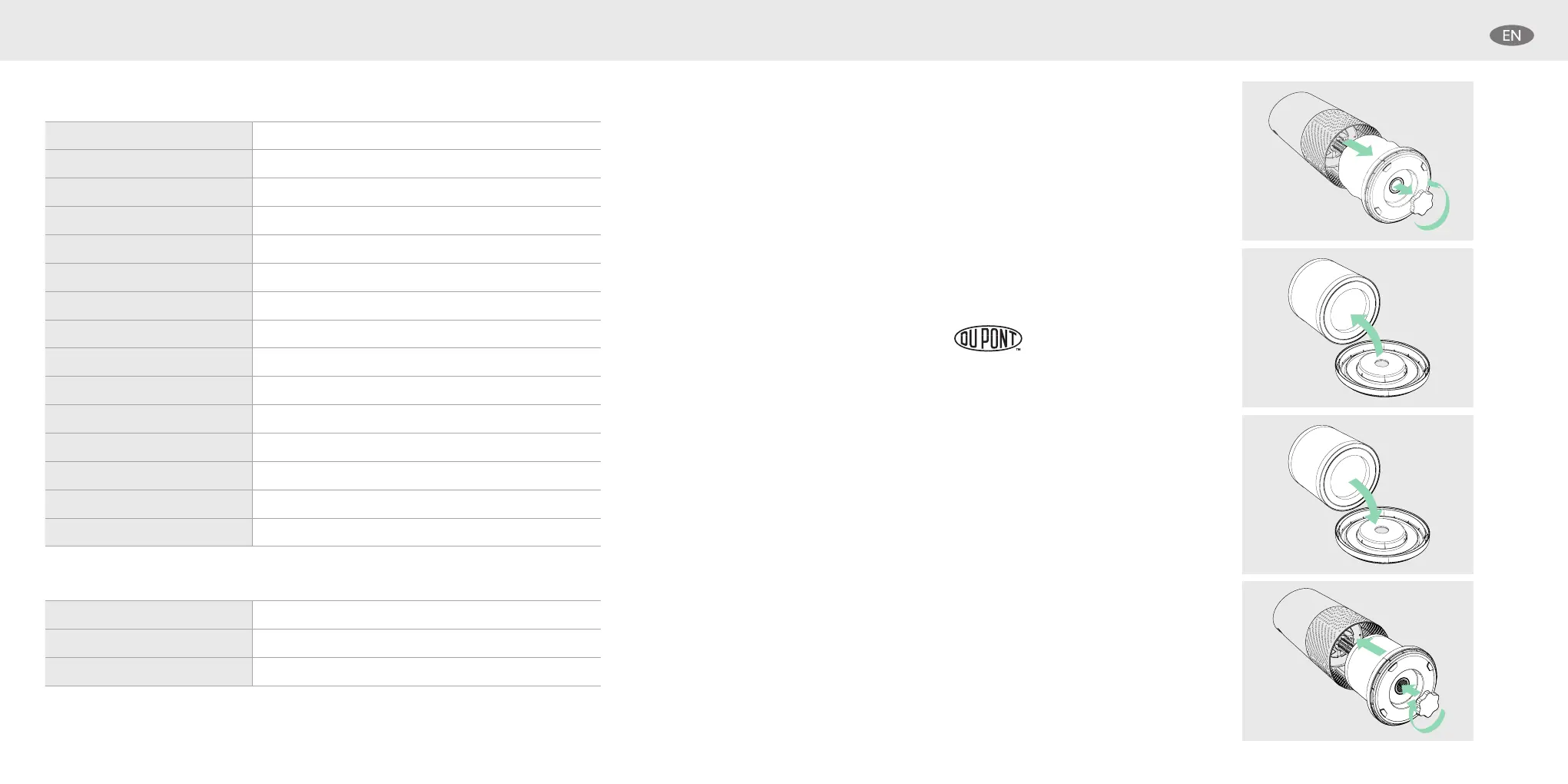
Accessing the filter chamber
1. Always power off the purifier by pressing the Power
Button and unplugging the power cord.
2. Gently place the unit on its side on the floor so that
the filter chamber cover and knob are exposed.
3. Turn the knob counter-clockwise and remove the
filter cover and 360° HEPA filter drum (Fig. A).
1. The HEPA indicator will glow red when it is time to
change the entire HEPA drum filter.
2. Gently pull the HEPA drum filter away from its place
secured to the filter cover (Fig. B).
3. Secure the replacement HEPA filter onto the filter
cover (Fig. C).
4. Gently replace the filter cover with filter drum into
the filter chamber and onto the threading, and turn
the knob clockwise until the knob and filter chamber
cover are securely tightened (Fig. D).
5. Plug-in and power on your purifier, and hold the
Reset button until the red HEPA indicator turns off.
Note: HEPA drum filter (on page 12) will include 3 layers: Washable
Prefilter, Carbon and True HEPA
Fig. A
Fig. B
Fig. C
Fig. D


 To Next Page