Wireless Audio Set - USER’S MANUAL
2
Installation
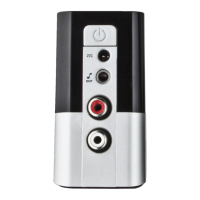
A Power Button
B Power Adapter socket
C 3.5mm Audio output
D Cinch Audio output
E LED light indicator
F USB receiver
G USB extension cradle
H Power Adapter
- Put the USB receiver in the extension cradle.
- Connect the extension cradle to your computer.
- Connect the power adapter to the device.
- Connect your speakers or sound system to the device (use the 3.5mm or the Cinch output).
- Press the power button on the wireless audio set.
The LED light indicates the connection status:
- LED blinking, not connected (normal when starting).
- LED constant on, connected.
Configuration
Windows 7/Vista
Go to ‘Playback Devices’ to configure the wireless device.
Set the ‘2.4G Wireless Transceiver’ as your default device.
Windows XP
Go to ‘Adjust Audio Properties’ to configure the wireless device.
Go to the ‘Audio’ tab.
Set the default device to ‘2.4G Wireless Transceiver’.
DC
1
2
3
4
5
6
7
8
9
10


 To Next Page