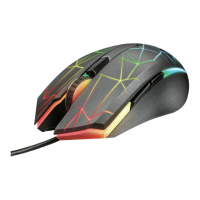
GXT 148 Gaming Mouse - USER’S MANUAL
- Button 1 (left mouse button)
- Button 3 (9, 10) (Scroll wheel)
- Scroll wheel LED (DPI indicator)
- Button 2 (right mouse button)
- Button 4 (default function = IE Forward)
- Button 7 (default function = Double-click)
- Button 5 (default function = IE Backward)
- Button 8 (default function = Profile cycle)
- Button 6 (default function = DPI cycle)
www.trust.com/21197/drivers
a - Connect the mouse to the USB port of the PC.
b - Wait until the message ‘Your device is ready to use’ appears.
a - Start the mouse configuration software (located in the taskbar).
b - You can now start to configure the mouse. In the manual will be referred to ‘Apply’ to update the
mouse.
The mouse can store 5 different profiles. You can instantly switch between these profiles by assigning the
profile switch function to one of the 10 buttons.














 To Next Page