Need help?
Do you have a question about the Trust CELOX GXT 165 and is the answer not in the manual?
Steps to download and install the Trust GXT 165 Gaming Mouse software.
How to select a button and assign a new function to it.
Modify DPI values using the respective slider bar.
Open the dedicated tool for creating and editing macros.
Steps to start recording, input sequence, and stop macro recording.
 General
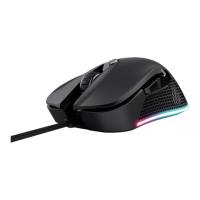
| Purpose | Gaming |
|---|---|
| Scroll type | Wheel |
| Buttons type | Pressed buttons |
| Polling rate | 125, 1000 Hz |
| Device interface | USB Type-A |
| Recommended usage | Universal |
| Acceleration (max) | 20 G |
| Scrolling directions | Vertical |
| Number of scroll wheels | 1 |
| Programmable mouse buttons | Yes |
| Movement detection technology | Optical |
| Number of programmable buttons | 8 |
| Cable length | 1.8 m |
| Form factor | Right-hand |
| Product color | Black |
| Surface coloration | Monochromatic |
| Power source | Cable |
| Country of origin | China |
| Harmonized System (HS) code | 8471607000 |
| Package depth | 210 mm |
| Package width | 180 mm |
| Package height | 50 mm |
| Package weight | 350 g |
 Weight and Dimensions
| Depth | 127 mm |
|---|---|
| Width | 83 mm |
| Height | 43 mm |
| Weight | 173 g |


 To Next Page