EasyManua.ls Logo

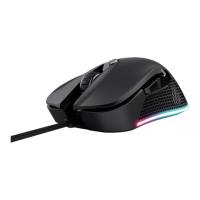
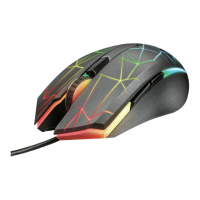
Trust GXT 922 YBAR - User Manual

Trust GXT 922 YBAR
79 pages
Print Icon
To Next Page IconTo Next Page
Loading...
www.trust.com/24309/faq
YBAR
PC Laptop
RGB
Question and Answer IconNeed help?

Do you have a question about the Trust GXT 922 YBAR and is the answer not in the manual?

Summary

Mouse Button Configuration and Installation

Mouse Button Layout

Details the default function assigned to each button (a-f) on the mouse.

Installation Guide

Provides step-by-step instructions for downloading and installing the Trust GXT 922 gaming mouse software.

Assign a Function

Explains how to reassign functions to individual mouse buttons through the software interface.

Mouse Customization and Settings

DPI Setting

Guide to configuring DPI levels, enabling/disabling DPI steps, and assigning LED colors.

Lighting Settings

Details how to change the mouse's LED lighting mode, animation speed, and direction.

Mouse Parameter Adjustment

Allows adjustment of Windows pointer speed, acceleration, scroll speed, and double-click speed.

Polling Rate Configuration

Explains how to set the mouse's polling rate from the available frequency options.

Advanced Features and Troubleshooting

Create a Macro

Instructions for creating and recording custom macros, including delay and loop settings.

Profile Management

Guide to managing mouse profiles, including saving, loading, exporting, and importing configurations.

Troubleshooting

Provides solutions for common software issues, such as startup problems, and contact information.

Summary

Mouse Button Configuration and Installation

Mouse Button Layout

Details the default function assigned to each button (a-f) on the mouse.

Installation Guide

Provides step-by-step instructions for downloading and installing the Trust GXT 922 gaming mouse software.

Assign a Function

Explains how to reassign functions to individual mouse buttons through the software interface.

Mouse Customization and Settings

DPI Setting

Guide to configuring DPI levels, enabling/disabling DPI steps, and assigning LED colors.

Lighting Settings

Details how to change the mouse's LED lighting mode, animation speed, and direction.

Mouse Parameter Adjustment

Allows adjustment of Windows pointer speed, acceleration, scroll speed, and double-click speed.

Polling Rate Configuration

Explains how to set the mouse's polling rate from the available frequency options.

Advanced Features and Troubleshooting

Create a Macro

Instructions for creating and recording custom macros, including delay and loop settings.

Profile Management

Guide to managing mouse profiles, including saving, loading, exporting, and importing configurations.

Troubleshooting

Provides solutions for common software issues, such as startup problems, and contact information.

Trust GXT 922 YBAR Specifications

General IconGeneral
TypeGaming Mouse
Sensor TypeOptical
Adjustable DPIYes
Polling Rate1000 Hz
ButtonsProgrammable
Number of Buttons8
LightingRGB
Cable Length1.8 m
Weight120 g

Related product manuals