EasyManua.ls Logo

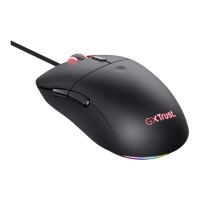
Trust MORFIX GXT 970 - User Manual

Trust MORFIX GXT 970
78 pages
Print Icon
To Next Page IconTo Next Page
Loading...
Question and Answer IconNeed help?

Do you have a question about the Trust MORFIX GXT 970 and is the answer not in the manual?

Summary

Mouse Button Layout and Configuration

Mouse Button 1 (Default = Left Mouse Button)

Maps Button 1 to Left Mouse Button functionality.

Mouse Button 2 (Default = Right Mouse Button)

Maps Button 2 to Right Mouse Button functionality.

Mouse Button 3 (Default = Mid click)

Maps Button 3 to Middle Mouse Button click.

Mouse Button 6 (Default = DPI +)

Maps Button 6 to DPI increment function.

Mouse Button 7 (Default = DPI -)

Maps Button 7 to DPI decrement function.

Software Installation and Setup

Software Installation Steps

Guide to download, install, and launch the mouse software.

Assign a Function to Buttons

Steps to re-assign mouse buttons with desired functions.

Mouse Settings and Customization

DPI Setting Configuration

Configure DPI levels, colors, and enable/disable DPI steps.

Light Settings

Customize lighting modes, speed, and direction.

Mouse Parameter Adjustments

Adjust Windows acceleration, pointer speed, and scroll speed.

Polling Rate Settings

Set the mouse polling rate frequency.

Advanced Macro and Profile Management

Create a Macro

Record and save sequences of keystrokes for custom macros.

Select, Save or Load a Profile

Manage mouse profiles by selecting, saving, importing, or exporting.

Restore Default Settings

Reset the current mouse profile to factory defaults.

Trouble Shooting

Software Not Starting

Troubleshoot issues when the mouse software fails to launch.

Summary

Mouse Button Layout and Configuration

Mouse Button 1 (Default = Left Mouse Button)

Maps Button 1 to Left Mouse Button functionality.

Mouse Button 2 (Default = Right Mouse Button)

Maps Button 2 to Right Mouse Button functionality.

Mouse Button 3 (Default = Mid click)

Maps Button 3 to Middle Mouse Button click.

Mouse Button 6 (Default = DPI +)

Maps Button 6 to DPI increment function.

Mouse Button 7 (Default = DPI -)

Maps Button 7 to DPI decrement function.

Software Installation and Setup

Software Installation Steps

Guide to download, install, and launch the mouse software.

Assign a Function to Buttons

Steps to re-assign mouse buttons with desired functions.

Mouse Settings and Customization

DPI Setting Configuration

Configure DPI levels, colors, and enable/disable DPI steps.

Light Settings

Customize lighting modes, speed, and direction.

Mouse Parameter Adjustments

Adjust Windows acceleration, pointer speed, and scroll speed.

Polling Rate Settings

Set the mouse polling rate frequency.

Advanced Macro and Profile Management

Create a Macro

Record and save sequences of keystrokes for custom macros.

Select, Save or Load a Profile

Manage mouse profiles by selecting, saving, importing, or exporting.

Restore Default Settings

Reset the current mouse profile to factory defaults.

Trouble Shooting

Software Not Starting

Troubleshoot issues when the mouse software fails to launch.

Trust MORFIX GXT 970 Specifications

General IconGeneral
BrandTrust
ModelMORFIX GXT 970
CategoryMouse
LanguageEnglish

Related product manuals