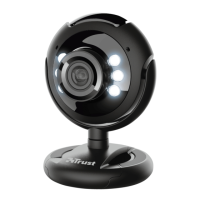
Need help?
Do you have a question about the Trust WB-1400T and is the answer not in the manual?
Install the webcam driver and software using the InstallShield Wizard.
Follow the Windows Found New Hardware Wizard for device setup and configuration.
Operate the AMCAP application for preview, audio, and video capture settings.
Capture still images using the snapshot button and save them via the software.
Provides tips for optimal performance, connection issues, and general device care.
Advises to keep the device away from liquids and not to attempt repair.
Outlines the product warranty period and reproduction restrictions for the manual.
 General
| Frame Rate | 30 fps |
|---|---|
| Connection | Wired |
| Interface | USB 2.0 |
| Compatibility | Windows, macOS |
| Max resolution | 1280x720 |
| Microphone | Yes, built-in |
| Focus Type | Fixed |
| Cable Length | 1.5 m |

 To Next Page