EasyManua.ls Logo

Trust 16428 - User Manual

Trust 16428
2 pages
Print Icon
To Next Page IconTo Next Page
Loading...
trust.com/16431/faq
2
USB
1
Quick Installation Guide
Spotlight Webcam Pro
16428
Question and Answer IconNeed help?

Do you have a question about the Trust 16428 and is the answer not in the manual?

Summary

Quick Installation Guide

Connect Webcam via USB

Connect the webcam to your computer using the provided USB cable.

Positioning the Webcam

Mount the webcam on your monitor or place it on a stable surface for optimal viewing.

Software and Audio Configuration

Adjusting Camera and Environment

Instructions for adjusting camera settings and optimal placement in the environment.

Windows XP Audio Setup

Configure microphone settings in Windows XP for optimal audio input.

Windows 7;Vista Audio Setup

Configure microphone settings in Windows 7 and Vista for optimal audio input.
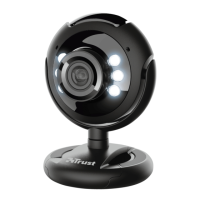
Summary

Quick Installation Guide

Connect Webcam via USB

Connect the webcam to your computer using the provided USB cable.

Positioning the Webcam

Mount the webcam on your monitor or place it on a stable surface for optimal viewing.

Software and Audio Configuration

Adjusting Camera and Environment

Instructions for adjusting camera settings and optimal placement in the environment.

Windows XP Audio Setup

Configure microphone settings in Windows XP for optimal audio input.

Windows 7;Vista Audio Setup

Configure microphone settings in Windows 7 and Vista for optimal audio input.

Trust 16428 Specifications

General IconGeneral
BrandTrust
Model16428
CategoryWebcam
LanguageEnglish

Related product manuals