EasyManua.ls Logo

TSI Instruments 4043 - 2 Setting-Up; Supplying Power

TSI Instruments 4043
17 pages
Print Icon
To Next Page IconTo Next Page
To Previous Page IconTo Previous Page
Loading...
3
Chapter 2
Setting-Up
Supplying Power
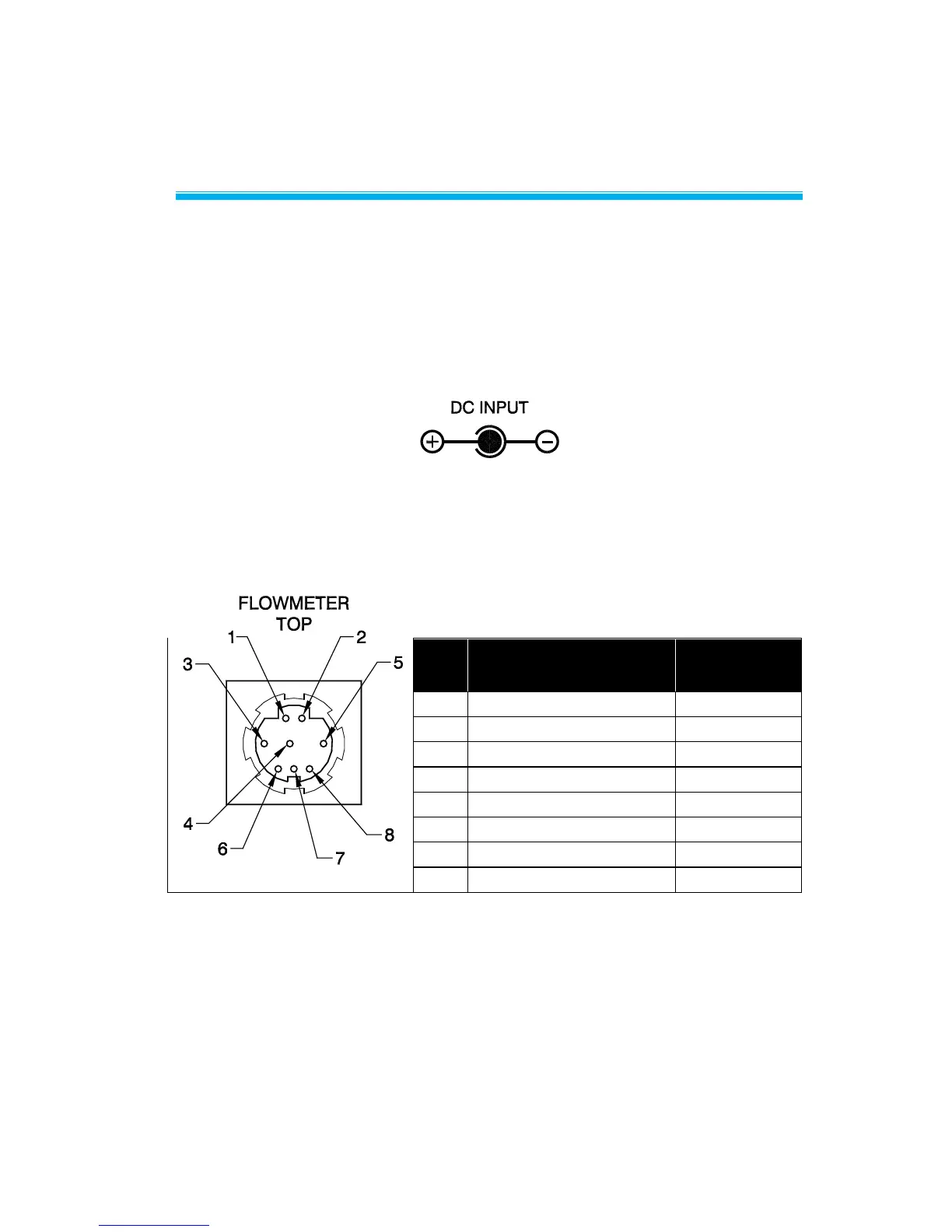
The flowmeter can be powered in one of two ways: through the power
jack using the supplied AC adapter or through the mini-DIN
connector. The DC power input connector is shown below along with
the power requirements.
Power Supply: 7.5 VDC ± 1.5 V, 300 mA maximum
When supplying power through the TSI-supplied interface cable, line
up the arrow on the connector with the bottom side of the flowmeter.
Flowmeter connector pin-out designations are shown below.

Table 2. List of Connector Pin-outs and
Cable Color Code Designations
Function
Cable Color
Code
Power Input (+)
Black
Power Ground (-)
Green
Analog Output (+)
Red
Analog Ground (-)
Brown
(no connection)
Blue
RS232 Receive (in)
White
RS232 Transmit (out)
Yellow
Logic Ground
Gray
www.GlobalTestSupply.com
Find Quality Products Online at: sales@GlobalTestSupply.com

Related product manuals