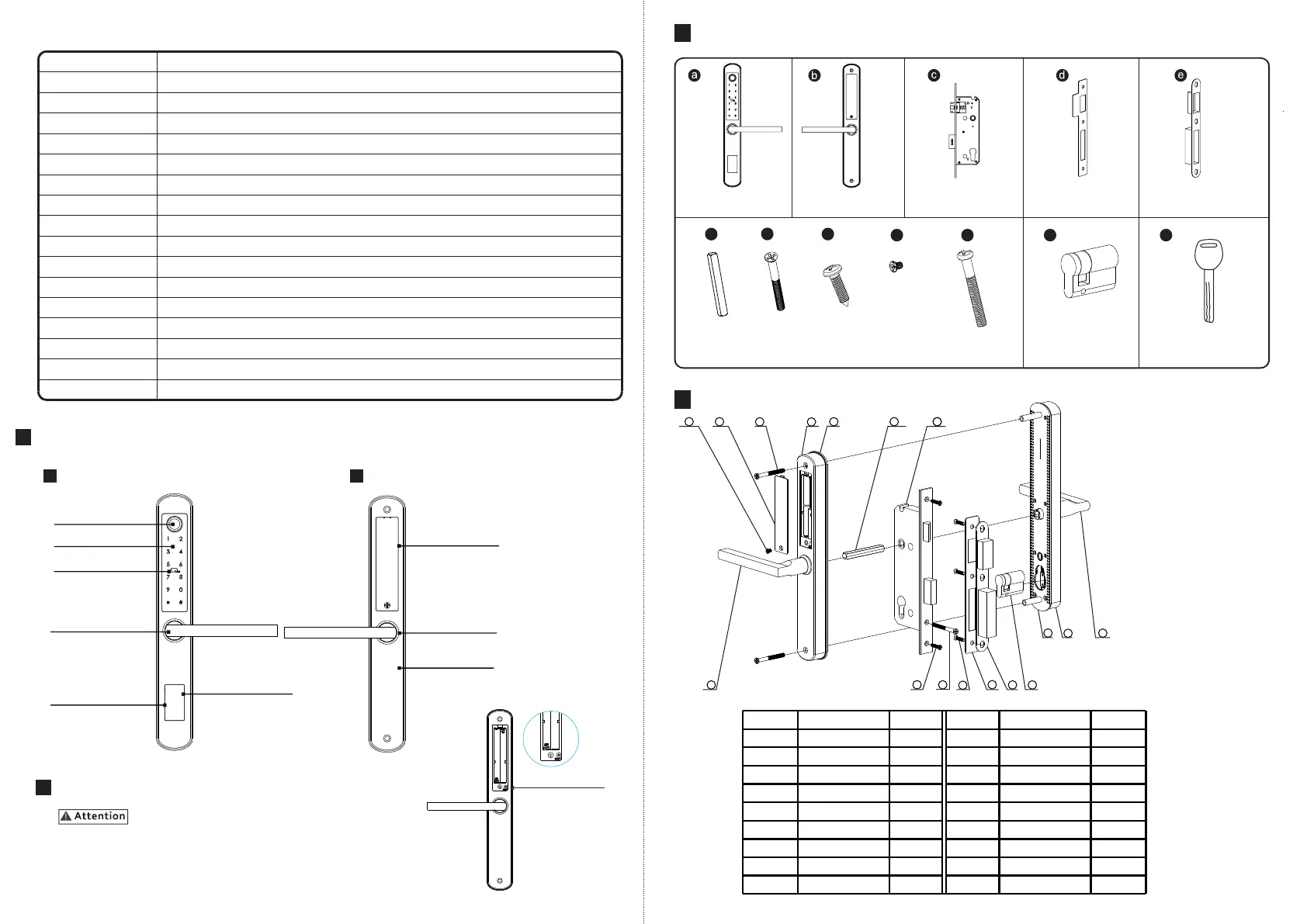
LOCK ACCESSORIES
Lock Mortise
Back Panel
Front Panel
Strike Plate
1 Pcs
1 Pcs
1 Pcs
1 Pcs
1 Pcs
Strike Box
Spindle
1 Pcs
Wood Screws
4 Pcs
M4 Screws
2 Pcs
Cylinder
1 Pcs
Spindle
Back Panel
No.
Name
Quantity
1
No.
Name
Quantity
2
3
4
5
6
7
8
9
10
11
12
13
14
15
Mortise
Front Handle
Front Panel
1
1
1
1
2
1
1
1
1
3
1
1
1
1
1
Rubber Gasket
Assemble Screw
Battery Box Cover
Battery Cover
Back Handle
Faceplate Screw
Cylinder Screw
Strike Screw
Strike
Strike Box
Cylinder
Front Gasket
16
17
2
1
17
1
2
3
4
5
6
7
8
9
10
11
12
13
14
15
16
Manual Key
2 Pcs
EXPLODED VIEW
4
3
Cylinder Screw
1 Pcs
Battery Box
Cover Screw
1 Pcs
f
g
h
i
j
k
m
1
2
Mat erial
304#stainless steel, ABS ,arcylic
Available Col or
Satin Nickle and Black Nickle
Door Thickness
38-55(mm)
Comm unication
BLE 5.0
Suppo rt OS
iOS 7.0 or above, And roid 4.4 or above
Batter y Life 10000 times normal open(12months)
Power Suppl y
DC6V :4pcs AAA alkaline bat teries
Static Cur rent
<50 uA
Unl ock Way
IC card, Passcode , fingerprint,APP, manual Key
Unl ock Time
1-1.5seconds
Working Temper ature
-20~45 degree
Working Humi dity
10%~95%
Dyn ami c Cur rent
<20 0mA
IP Class
IP62(Not standard)
Available Mor tise
2885/3585/4585/5085/6085/7085 Mor tise
WiFi Gat ewa y
Available
Packing
Carton box with PE foam inside
2
Keypad
Induction Area
Front Handle
Cylinder Position
Battery Box
Back Handle
Back Panel
Reset Button
USB Position
1
Sensor
Front Panel Back Panel
Reset to Factory State
Long press the reset button (on the rear side of back panel,
refer the photo) 2 seconds until 2 sound beep to factory state,
default passcode is:123456.
SYSTEM INTRODUCTION
PRODUCT SPECIFICATION
1


 To Next Page