3
4
A210 -4585
DOOR FR ONT/ BACK
Template
7
PREPARING TO INSTALL
7.1 Line Drawing
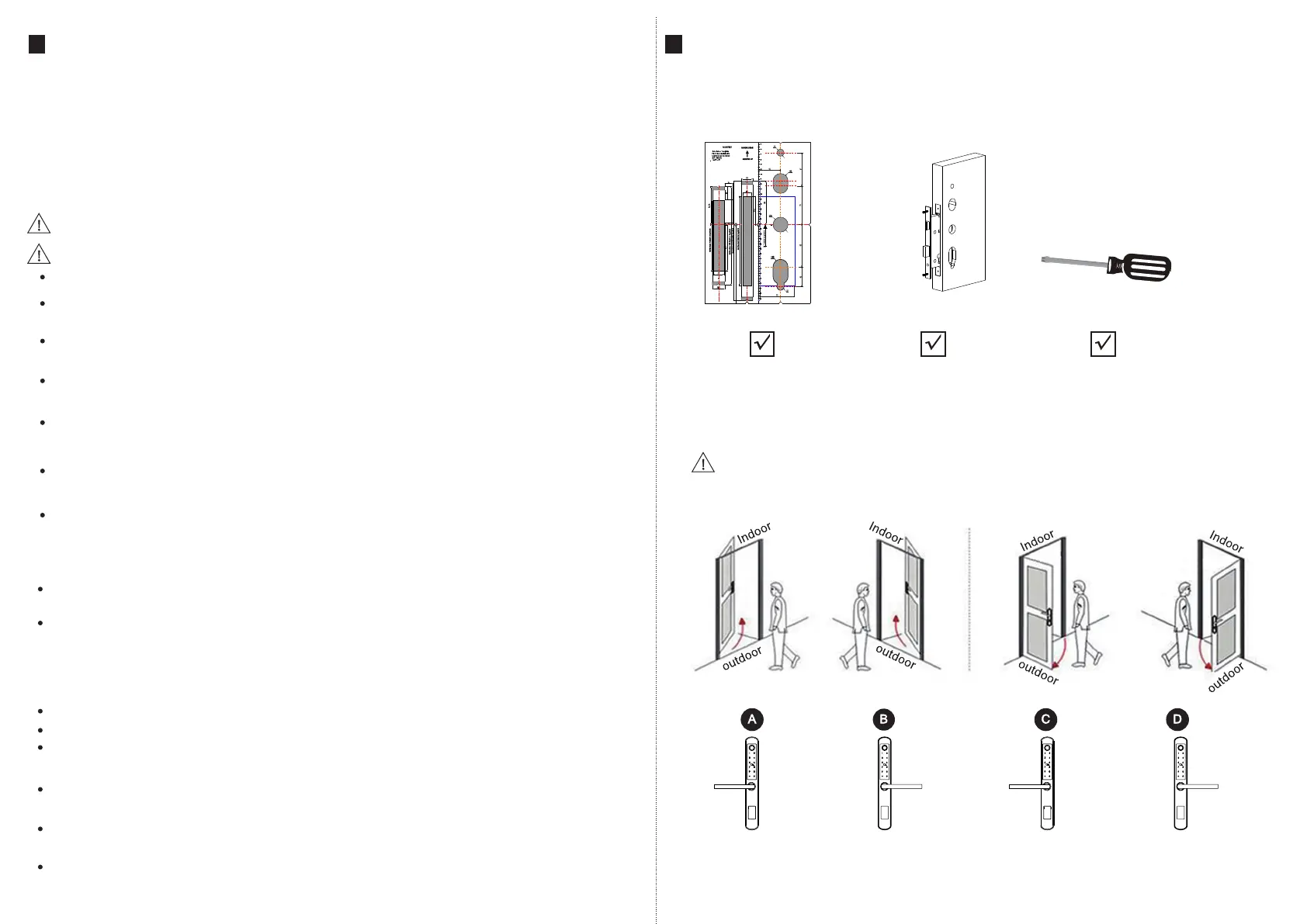
7.2 Determining Lever Handing
3
4
Draw a horizontal center line inside and outside the door at 1 meter from the ground.
Fold the template, make the handle center line align at the door horizontal center line,
then draw out the hole lines at front and side.
5
INFORMATION AND SAFETY WARNINGS:
This user manual will guide you through the functions and usages of our A260 smart lock.
It is important that you follow the instructions and regard all notes that appear throughout
this manual. Consult this manual before you attempt to use this lock. If you have any
questions that not answered by this manual or on need of non-routine service, please call
our customer service hotline or send FAQ to us.
5.2 Safety Warnings:
5.1 Introduction
When reading this manual, note these icons: notes with the icon Must be read,
understood and obeyed to prevent injury or damage to the lock.
General Usage
This lock shall only be used as described in this manual.
Verify that all parts of the lock are accounted for. If any parts are missing, please contact
our service person.
There is protective film on the front touch panel, if there are some scratches on the film,
please remove the film if you need.
Please use 4pcs AAA batteries. Do not mix old and new batteries or other Zn/Mn batteries.
Never insert objects into the lock other than batteries as described in this manual.
Verify all surfaces are flat and level before beginning installation, installation on doors
or surface with any types of deformity such as gaps or warping may cause the lock to
malfunction or fail to operate entirely.
Never apply any cleaner directly to any part of this lock. Only use clean water or mild
cleaner on a soft non-abrasive cloth when cleaning.
The lock must be used with Tuyasmart APP. The lock will function without the APP but
full functionality may only be achieved when the APP is on use.
5.3 SALES AND SERVICE TERMS
Any error or question in our manual or sales term, please feel free to contact with us.
For any wrong operation or installation to the user, we do not responsible for the duty.
For the damage caused by anthropic factor or inevitable reason, we do not pay for the loss
or maintain for free, please check our after sale service terms.
Please do not take apart the lock if you are not technician, if necessary, please make the
operations under the guide of technician.
Notice: there maybe a little difference for product pictures with real product, please
subject to our real products.
After changing the battery, please do not throw away the battery, kindly refund to recycle
bin in case of pollution!
Limited 1-year Electronic Warranty Limited Lifetime Mechanical and Finish Warranty
This A210 product comes with a 1-year Limited Warranty on Electronic Parts and a Limited
lifetime. Mechanical and Finish Warranty against defects in materials and workmanship
under normal use to the original residential user. Proof of purchase and ownership is
required for the warranty to be in effect.
Please read the manual carefully before use!
Trepanning Screwdriver
The hand of the door is determined from the secure side of the door. The term secure
means the side from which you initially unlock and enter from outside.
Stand outside of the door, choose the left/right direction with push or pull to unlock.
Left Push Right Push Left Pull Right Pull


 To Next Page
 Loading...