Wonder Bug
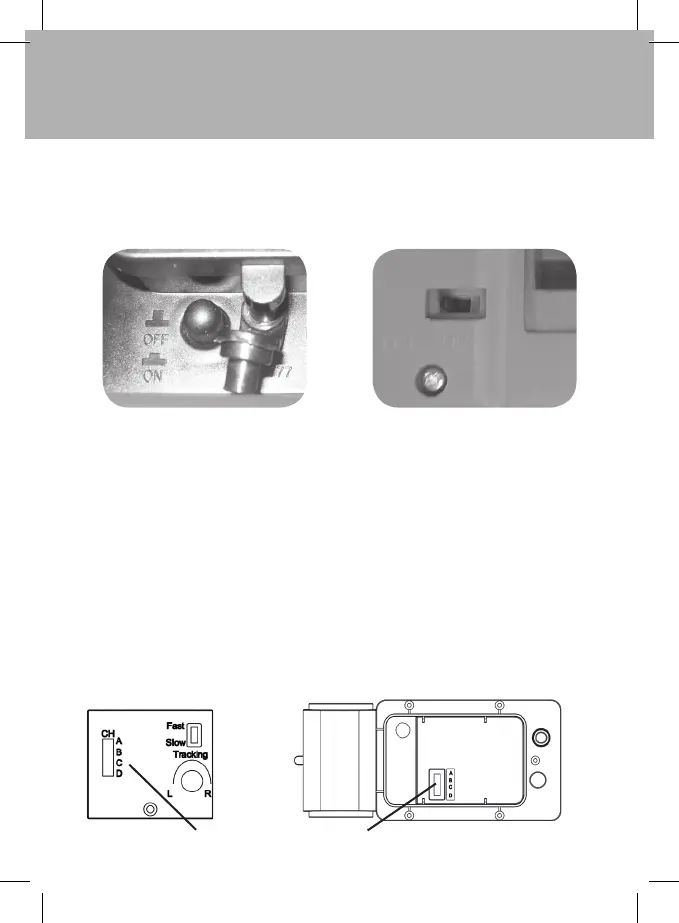
To switch the Wonder Bug on, press the push switch under the Wonder Bug (next to the
charging socket) .When the Wonder Bug is switched on the eyes will light up. To switch the
Wonder Bug off just press the push switch again.
To switch the Handset on, move the slide switch to the ON position.
Changing the channel of your Wonder Bug
Your Wonder Bug has been designed so that four Wonder Bugs can operate simultaneously
with a choice of two speeds. Your Wonder Bug comes pre-set to the first channel and the
slow speed setting. If you purchase another Wonder Bug you will need to change it to use
another channel. You must change the channel on both the Handset and the Wonder Bug.
To use the Full all-terrain capabilities of the WonderBug outdoors please select the “Fast”
Setting on the handset. The speed selection switch is located underneath the handset
battery hatch.
To change the channel:
Remove the battery cover using a screwdriver and lift out the battery,
but do not disconnect it.
Move the slide switch to the desired channel, either A, B, C or D, then place the battery back
in the battery compartment and secure the battery cover. Please ensure the Gasket is seated
properly or water will be able to enter the battery compartment.
Channel select switch


 To Next Page