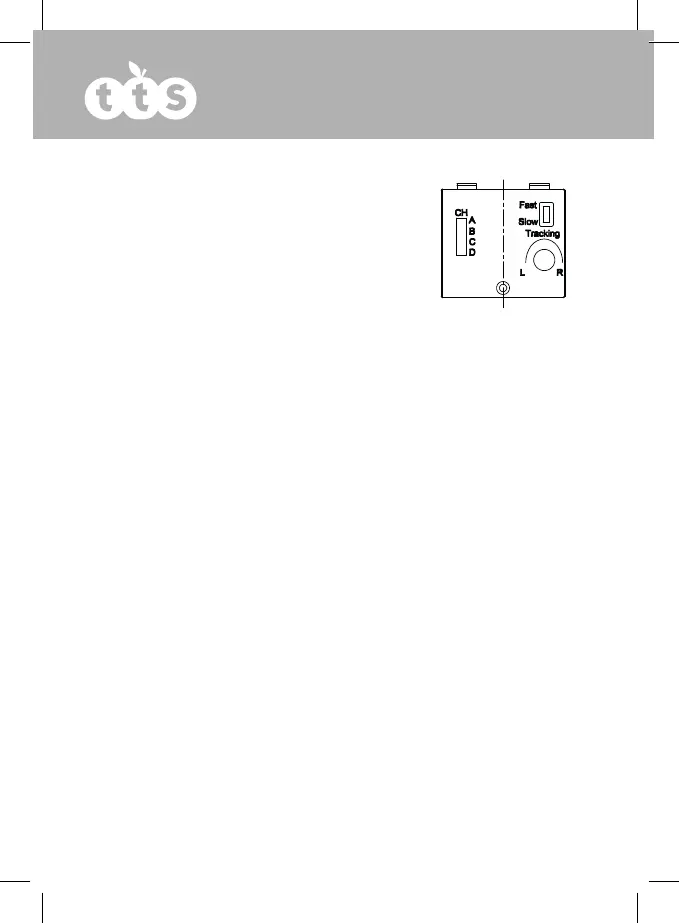
Adjusting the tracking
If your Wonder Bug has a tendency to turn to the left or
right this can be corrected by using the tracking control
on the handset.
Use a small coin to adjust the position of the tracking
control until your Wonder Bug moves in a straight line.
Status LED
Your Wonder Bug and Handset have LEDs that give the user information about the Wonder
Bug.
Wonder Bug
Eyes White – power is on
Eyes White when charging – Wonder Bug is fully charged
Eyes are Red – power is on and Wonder Bug is reversing
Eyes are Red – Wonder Bug is charging
International Charger
The Wonder Bug is supplied with a multi-region adaptor. The adaptor is supplied with the
UK plug fitted but you can change this easily to suit any country. Press the release button
behind the plug head and remove the UK plug and replace with the required plug
module. Push the plug module in until it “clicks” in place securely.
The safety isolating transformer to be used with the product should be regularly
examined for potential hazards such as damage to the cable, cord, plug, enclosure or
other parts. In the event of any damage, the adaptor must not be used until the damage
has been properly repaired.
The toy is not intended for children under 3 years old.
The toy must only be used with the recommended transformer.
The transformer is not a toy.
Toys liable to be cleaned with liquids are to be disconnected from the transformer before
cleaning.


 To Next Page