Introduce to
V
enom
X4
TM
Mouse
Start
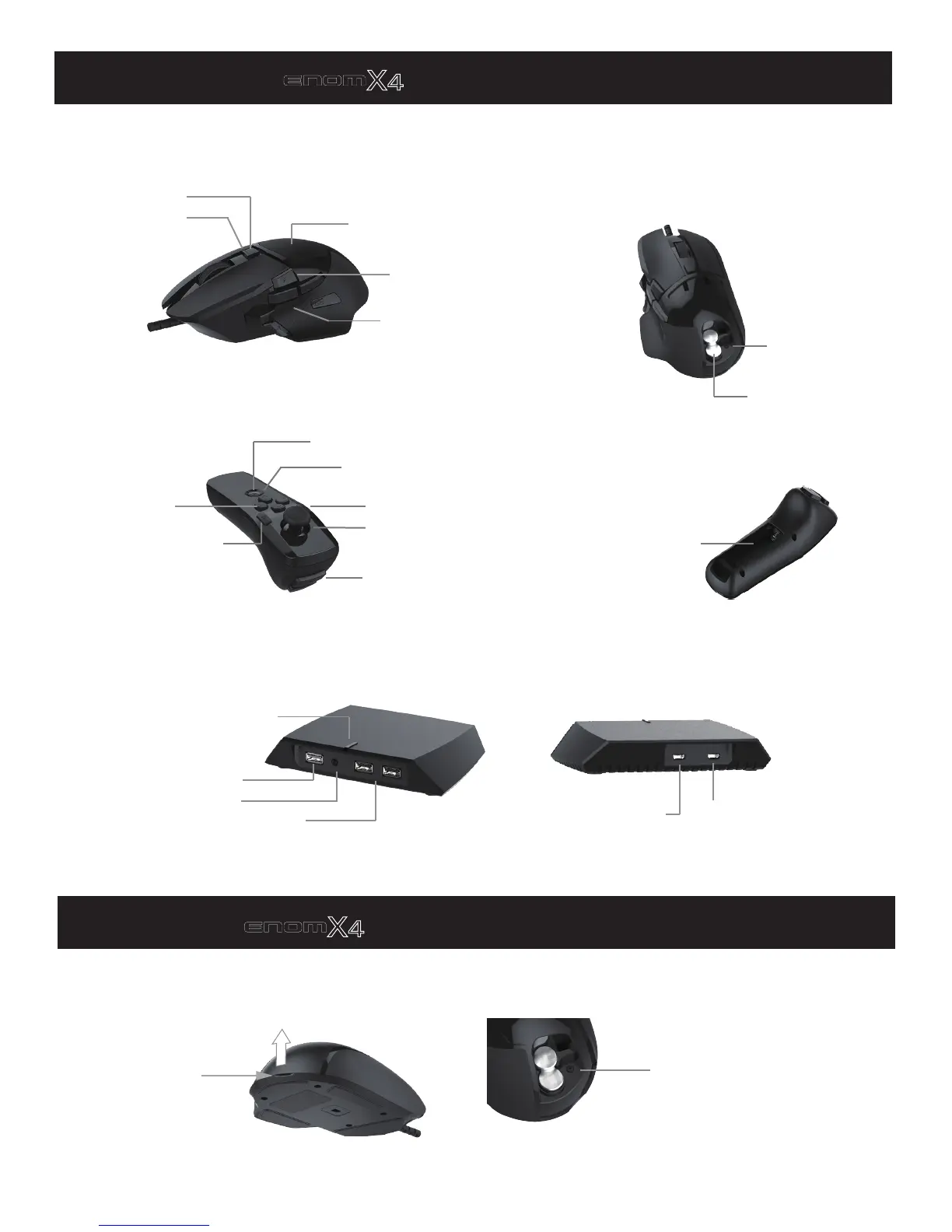
Profile Color LED
CPI switch
Function Key: F(R)
Iron Weight Cover
Wand
Transceiver
Action Keys: L1,L2
Function Key: F(L)D-Pad
L4
Power/PS
Left Joystick/L3
Battery bay
Profile Select/WiFi Button/
Multi-Function LED
Pair Button
Mouse/Keyboard USB ports
External Power Supply Jack:
to 5V charger (optional)
Host Micro USB Jack:
to console or PC
Start with
V
enom
X4
TM
mouse and wand
Open the Iron Weight cover to put one or two weight to get comfortable mouse weight.
To open the cover:
Side action Keys:
G4/G5/G6/G7/G8
Controller USB port
Iron Weight
Left up the cover at
the slot to open:
Put the weight irons onto the slots.
Switch the Mouse CPI:
Press the CPI button to switch the
mouse CPI, 3 preset value can be
selected, the LED color on Start
button indicates the corresponding
profile.
Power LEDs


 To Next Page