Introduce to
Venom
X
TM
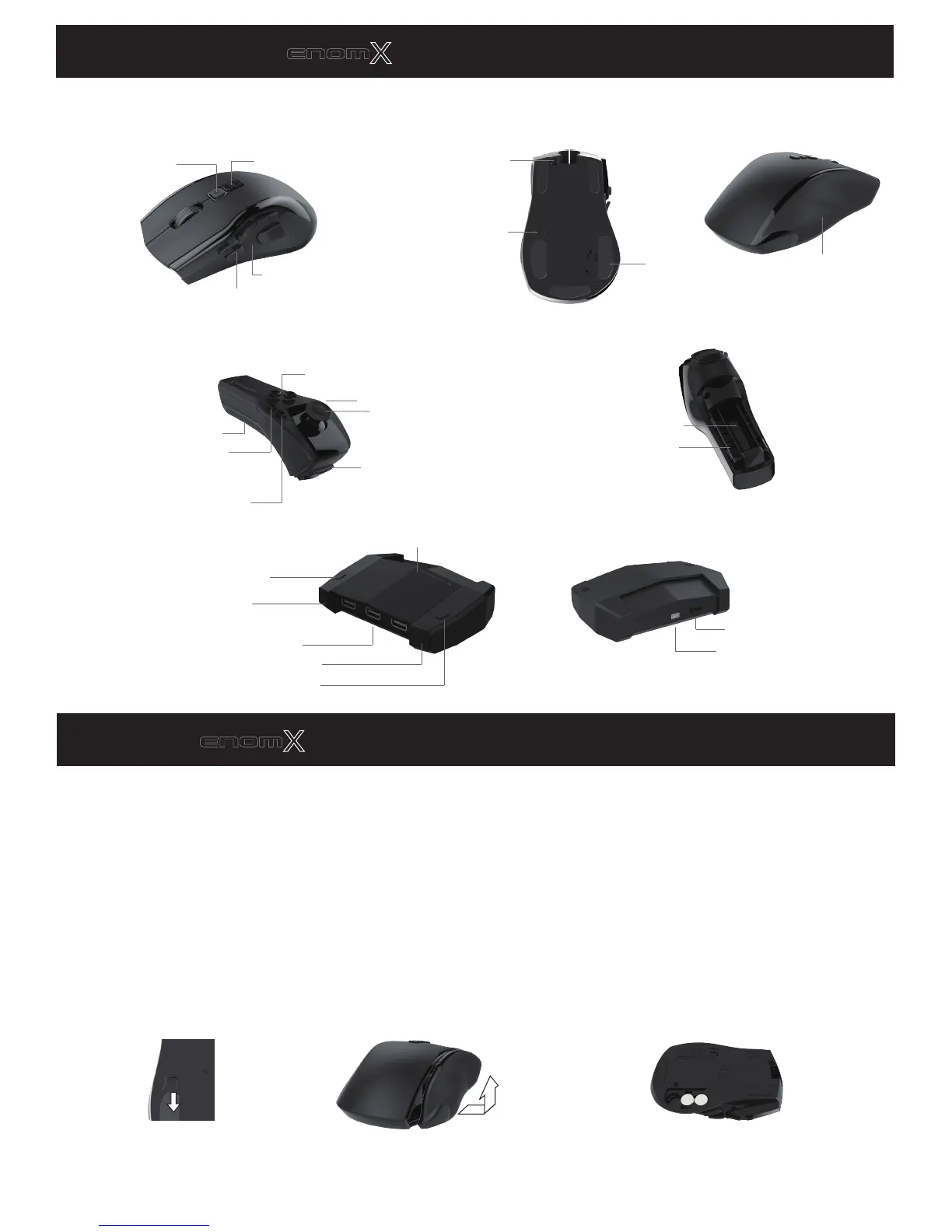
Mouse
Power/Start
/Option/Menu
▲/▼: ± DPI
Mouse Function Key: F(R)
Weight Cover
Battery Cover Lock
Cable Lock
Battery Cover
Wand
Transceiver
Action Keys: L1,L2
Battery Cover
Wand Function Key: F(L)
D-Pad
L4:Select/Share
/Back/View
Power/PS/Guide
Left Joystick/L3
Weight chamber
Battery bay
Profile Select Button
Pair Button
USB Jacks
Power/Data/Pairing LED
Iron Weight Storage Cover
Profile LEDs
Host Select Switch
Host USB Jack
Put weight pieces into weight chamber
to get comfortable mouse weight :
Install Venom
X
TM
Mouse
Venom-X mouse functions in wireless or wired mode. It will automatically switch modes depending if the mouse
USB cable is connected to the console or PC.
Venom-X mouse comes with 3 battery covers that ergonomically adjusting grips for better tailored gripping. Put
weight pieces into weight chamber to customize mouse weight.
To open the battery cover:
1.
Slide the battery cover
lock to "open" position.
2.
Open the cover from the
bottom and then push it up.
Action Keys: R4: Triangle/Y
R5: Circle/B
R6: Square/X
R7: Cross/A



 To Next Page