TrueChrome AF
TrueChrome Metrics
HD Lite
1.2 HDMI Cameras
Built-in Autofocus
Built-in measuring system
Built-in ISP
Real-time stitching
Real-time EDF
HDMI+USB2.0 interface
Built-in measuring system
Built-in ISP
Real-time stitching
Real-time EDF
HDMI+USB2.0 interface
Built-in ISP
HDMI+USB2.0 interface
Overviews
Standard lists
1 x Camera
1 x Software ( CD/U disk )
1 x SDcard
1 x Mouse
1 x Power adapter
1 x USB cable
1 x HDMI cable ( 2m )
( 12V 2A )
*1 x
*1 x
*1 x HDMI cable ( 0.5m )
*5 x Butterfly screw or 2xHand screw
*4x Black hexagon socket screw
Screen with bracket
HDMI adapter
Note: * items are only available when the camera is purchased with the screen.
2. Camera Interface Description
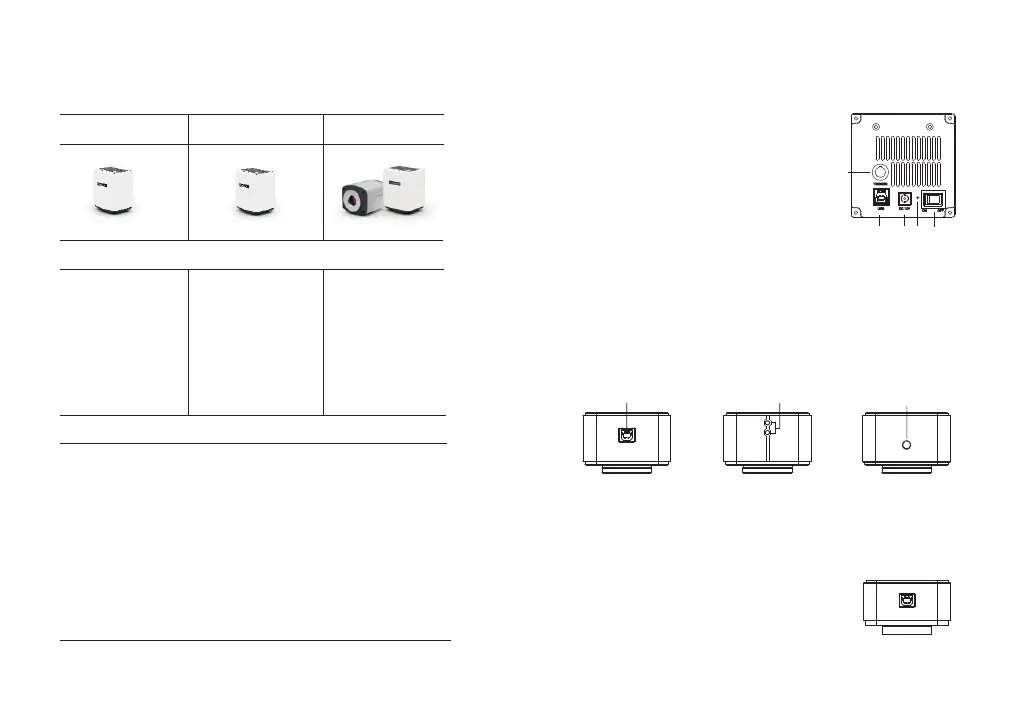
2.1 FL Cooled Camera
① USB3.0
② 2pcs Indicator lights
③ Screw positioning hole
⑤ Power switch② USB3.0
③ Power interface
④ Indicator light① * External trigger interface
①
② ③ ④
⑤
2.2 USB3.0 Camera
2.3 USB2.0 Camera
When the USB cable is connected, one indicator is always on; when the software is
running, another indicator flashes.
The body has only one USB2.0 interface, which can be
used directly after connecting to the computer.
1) After the camera is powered on, turn on the power on key, the indicator light is red;
2) After the software is turned on, the power indicator turns yellow.
3) * The color and monochrome cooled camera interface layout is slightly different, and
the color camera has no external trigger interface.
-4--3-


 To Next Page