4. Use in HDMI Mode
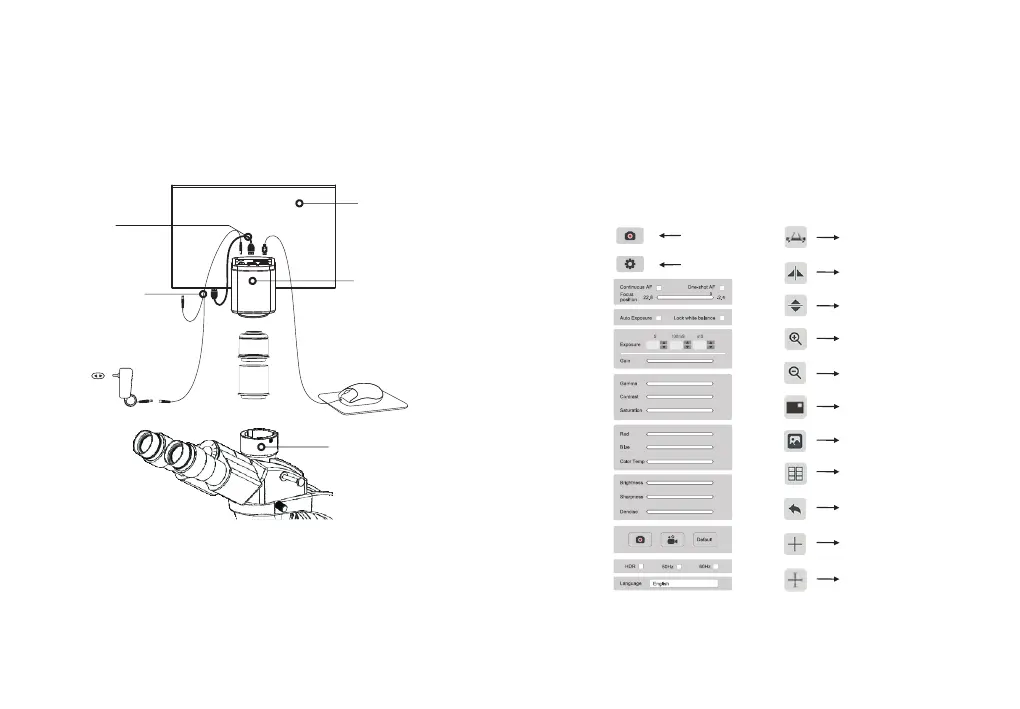
4.1 Camera Installation
4.2 Basic Use
1. After the connection is completed, press ON/OFF key until the blue light is on and
the moving cursor appears on the screen.
3. When the cursor is moved to the right of the screen, the shortcut button appears.
2. When the cursor is moved to the left of the screen, “Capture” and “Setting” icons
will appear. Click “Setting” to get the parameter setting menu.
Calibration
Horizontal flip
Vertical flip
Zoom in
Mask
Album
Compare
Back
Zoom out
Cross line
Cross line with scale
① Retina screen ③ Microscope
⑤HDMI cable ⑥ Y power splitter cable ⑦12V2A Power adapter
②HDMI camera ④ Mouse
-14--13-
Note: Different models of cameras have different functions. Please refer to the
camera's actual function interface.
⑦
④
③
①
⑥
⑤
②
Capture
Setting


 To Next Page