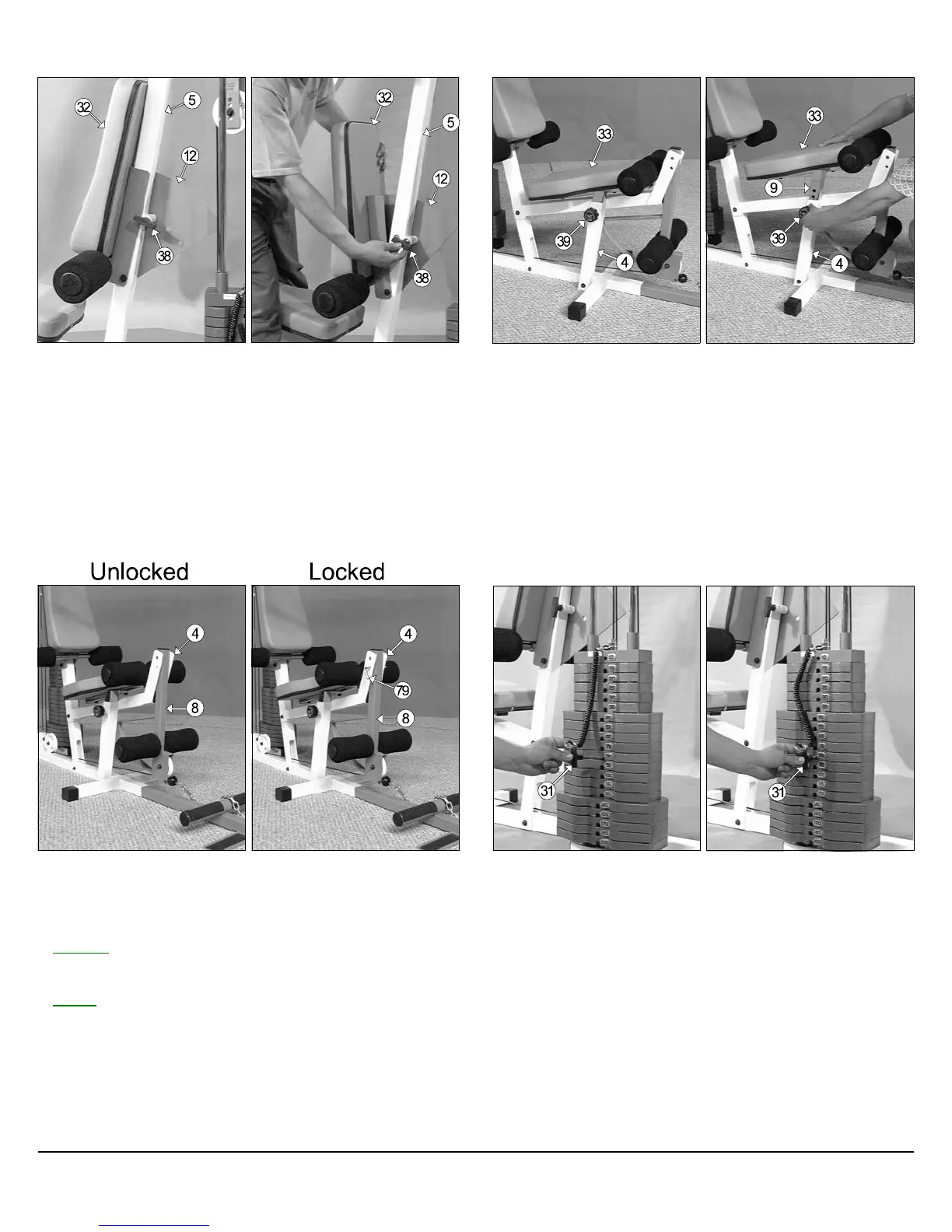
Fig. 72 Back Pad (#32) adjustment:
1. Grasp the Back Pad (#32).
2. Pull the Push Pull Pin 1/2” X 3-1/2 (#38) to release the Back Pad
Bracket (#12) from the Front Upright (#5).
3. Adjust the Back Pad (#32) to one of the three available positions.
4. Release the Push Pull Pin 1/2” X 3-1/2 (#38) and make sure it fully
engages into the selected hole of the Back Pad Bracket (#12).
Fig. 73 Seat Pad (#33) adjustment:
1. Grasp the Seat Pad (#33).
2. Turn counterclockwise then pull the Turn/Pull Pin w/Knob (#39) to release
the Bench Press Adj. Seat Tube (#9) from the Leg Extension Bench
Frame (#4).
3. Adjust the Seat Pad (#33) to a desired height.
4. Release the Turn/Pull Pin w/Knob (#39) and make sure it fully engages
into the selected hole of the Bench Press Adj Seat Tube (#9).
5. Complete the adjustment by turning the Turn/Pull Pin w/Knob (#39)
clockwise.
Adjustment Features
Fig. 74 Locking the Leg Extension Arm (#8)
1. Locate the L-Locking Pin (#79).
2. Insert the L-Locking Pin (#79) through the Leg Extension Bench
Frame (#4) and the Leg Extension Arm (#8), as shown above.
Unlocked Leg Extension Arm used on Exercises:
♦ Leg Extension
♦ Leg Curl
Locked Leg Extension Arm used on Exercises:
♦ Low Row
♦ Standing Arm Curl
♦ Inner / Outer Thigh
♦ Seated Row
♦ Seated Chest Press
♦ Seated Shoulder Press
Fig. 75 Weight Selection
1. Grasp the Weight Selector Pin (#31).
2. Insert the Weight Selector Pin (#31) into desired Weight Plate. The
Decal Weight Number (#87) on the selected Weight Plate will show
the amount of weight selected. The Top/Plate Selector Bar (#26)
must be resting on top of the Weight Stack.
3. Make sure the Weight Selector Pin (#31) has been fully inserted into
the selected Weight Plate.
CFM-550 Compact Frontal Machine
24



 To Next Page