CHARGING
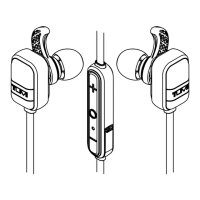
YOUR TUMI EARBUDS
• Before using your Earbuds for the
first time, charge the unit 7 to 9 hours.
• To charge your Earbuds, plug the
included USB-to-Micro-USB cable
into a wall power adapter (not
included) or into a powered USB
port on a computer. Plug the Micro-
USB connector end of the cable
into the Earbud charging port.
• It will take approximately 2
hours to reach a full charge.
1. Start playing music on your
paired device. Music plays
through your Earbud.
2. On your Earbud, push “+” or “-“ button
to increase or decrease volume.
3. NOTE: A tone sounds when maximum
volume setting is achieved.
4. Press the “O” Multi-Function
button to pause playback. Press
again to resume playback.
PLAY MUSIC


 To Next Page